Malware Types: Virus, Worm, Trojan, Ransomware – Science & Technology Notes
Malware, also known as malicious software, is any programme or file that is designed to cause harm to a computer, network, or server. Malware can take the form of computer viruses, worms, Trojan horses, ransomware, and spyware. These malicious programmes steal, encrypt, and delete sensitive data, as well as alter or hijack core computing functions and track end users' computer activity. In this article, we will discuss in detail regarding various malware types which will be helpful for UPSC exam preparation.
Table of Contents
Malware – Background
- Computer-enabled fraud and service theft evolved alongside the information technology that made it possible.
- In 1990, computer scientist and security researcher Yisrael Radai coined the term malware.
- Malicious software was previously referred to as computer viruses.
- The Creeper virus, created as an experiment by BBN Technologies engineer Robert Thomas in 1971, was one of the first known examples of malware.
What is Malware?
- Malware is malicious software that is specifically designed to harm computers and computer systems.
- Software that causes unintentional damage, on the other hand, is commonly referred to as a software bug.
- Malware is a catch-all term for a variety of online threats such as viruses, spyware, adware, ransomware, and other types of malicious software.
- Malware can enter a network via phishing, malicious attachments, malicious downloads, social engineering, or flash drives.
- All it takes is one employee's mistaken click for the malware to install itself and begin executing its programme.
- The frequency of malware attacks continues to rise, as do the costs associated with them, and the variety and complexity of threat vectors and attack types — ransomware gangs, for example, are on the rise and are responsible for the majority of major ransomware attacks.
- Not to mention, as more businesses use IoT devices and digitise, supply chain attacks are bound to increase.
Types of Malwares
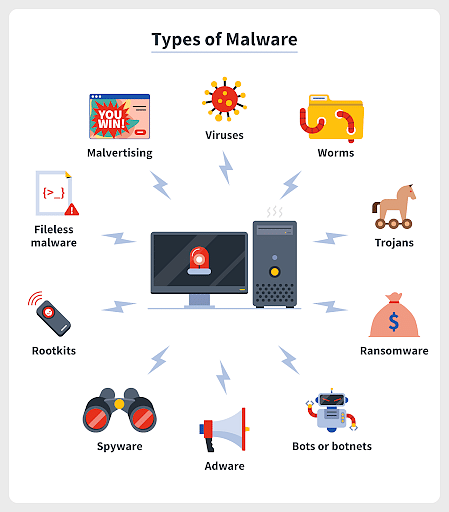
Types of Malware
| Malware | Description |
|---|---|
| Virus |
|
| Worm |
|
| Adware |
|
| Trojans |
|
| Spyware |
|
| Rootkit |
|
| Exploits or Exploit Kits |
|
| Fileless Malware |
|
| Macros Malware |
|
| Ransomware |
|
| Supply Chain Attacks |
|
| Keyloggers |
|
| Bots/Botnets |
|
| Logic Bombs |
|
| Backdoors |
|
| Hybrid Malware |
|
| Malicious Cryptomining / Cryptojacking |
|
| RAM Scrapper |
|
How Does Malware Spread?
- Email: Malware can force your computer to send emails with infected attachments or links to malicious websites if your email has been compromised. The malware is installed on the recipient's computer when they open the attachment or click the link, and the cycle continues.
- Hackers can load malware onto USB flash drives and wait for unsuspecting victims to plug them into their computers. This method is frequently used in corporate espionage.
- Pop-up alerts: These include bogus security alerts that trick you into downloading bogus security software, which can contain additional malware in some cases.
- Vulnerabilities: Malware can gain unauthorised access to a computer, hardware, or network due to a security flaw in the software.
- Backdoors: Intentional or unintentional gaps in software, hardware, networks or system security.
- Drive-by downloads are unintentional software downloads that occur with or without the end-user's knowledge.
- Privilege escalation: When an attacker gains elevated access to a computer or network and then uses it to launch an attack.
- Homogeneity: When all systems use the same operating system and are linked to the same network, the risk of a successful worm spreading to other computers increases.
- Blended Threats: Malware packages that combine characteristics from multiple types of malware, making them more difficult to detect and stop because they can exploit multiple vulnerabilities.
Signs of Malware Infection
- A computer that is slow, crashes, or freezes.
- The well-known 'blue screen of death'.
- Programmes that open and close automatically or change themselves.
- Increased pop-ups, toolbars, and other unwanted programmes due to a lack of storage space.
- Emails and messages are being sent without your knowledge.
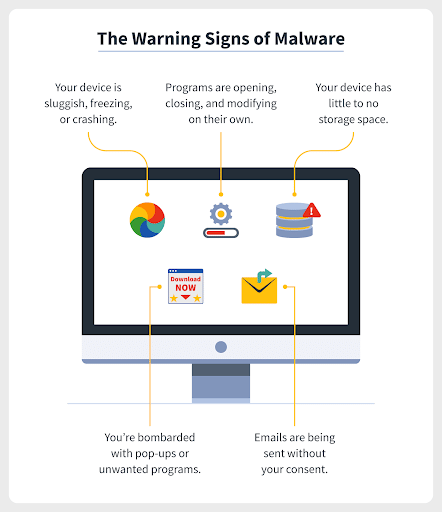
Warning Signs of Malware
How to Defend Against Malware?
Using Monitoring and Detection Software
- These tools can monitor your environment for unusual malware behaviour and alert your security team to it, allowing your organisation to take swift action against threats in their early stages.
Making Use of Security Awareness Training
- Humans are a common vector for threat actors, particularly through phishing and other forms of social engineering. It only takes one click on a suspicious email to launch a massive attack.
- Security awareness training fosters a security culture and teaches users how they are both the first line of defence and frequently the first target for hackers.
Have a Vulnerability Management Plan in Place
- Over 25,000 vulnerabilities were recorded in 2022, with over 800 actively exploited. Furthermore, many attacks that began with an exploited vulnerability could have been patched or mitigated previously.
- An organisation can protect itself from malware, including rootkits, by regularly scanning for and patching vulnerabilities.
Establish a Zero Trust Framework
- A Zero Trust framework, which is a component of identity and access management, restricts user access and requires all users to be verified before access is granted.
- If malware, such as spyware, is able to obtain credentials, the threat actor will be unable to move forward or laterally.
Avoid any suspicious emails, links, or websites
- Staying Cyber Safe entails being suspicious of attachments from unknown sources, links that appear too good to be true, and even advertisements that appear too good to be true.
- All of these could be malware-infected phishing attempts. Play it safe and avoid engaging if your gut instinct tells you not to.
Modify spam filters
- Because email is the most common method for malware distribution, it's critical to brush up on your email security — start by setting your spam filters to high.
- This ensures that you are never tempted to click on a malicious link, email, or attachment from the start.
Maintain software updates
- Software updates are critical because they close security gaps that cybercriminals could exploit.
- As a result, make a point of installing software updates as soon as they become available, and consider enabling automatic updates.
Back up your files on a regular basis
- The main reason for backing up your data is to have a secure archive of your important information, whether it's classified documents for your business or treasured family photos.
- In this manner, you can quickly and seamlessly restore your device in the event of data loss, such as that caused by a malware infection.
Initiatives by Government of India
National Cyber Security Policy 2013
- The Indian government has already implemented a National Cyber Security Policy.
- The National Cyber Security Policy outlines a road map for developing a framework for a comprehensive, collaborative, and collective response to the issue of cyber security at all levels of government.
Computer Emergency Response Team (CERT-In)
- It has been designated as the nodal agency for crisis management efforts.
- CERT-In will also serve as a clearinghouse for coordinated actions and the operationalization of sectoral CERTs.
- Early warnings will also be issued by CERT-in.
Cyber Swachhta Kendra
- It is a Botnet Cleaning and Malware Analysis Centre (BCMAC) run by the Indian Computer Emergency Response Team (CERT-In) as part of the Government of India's Digital India initiative, which is overseen by the Ministry of Electronics and Information Technology (MeitY).
- Its goal is to secure the cyberspace by detecting botnet infections in India and notifying, enabling cleaning, and securing end user systems to prevent further infections.
Conclusion
Malware isn't always easy to detect, especially when it's fileless malware. Organisations and individuals should be on the lookout for an increase in popup ads, web browser redirects, suspicious posts on social media accounts, and messages about compromised accounts or device security. Changes in a device's performance, such as it running much slower, may also indicate a problem. There is no getting around the fact that malware is malicious. Understanding the various types of malware and how they spread can help you take a more holistic approach to avoiding cyber threats.
| Other Relevant Links | |
|---|---|
| Science & Technology Policy in India | Scientific Policy Resolution 1958 |
| Science & Technology Policy of 1983 | Science & Technology Policy of 2003 |
| Science, Technology and Innovation Policy 2013 | New Initiatives Aligned with the National Agenda |
| India and World collaboration in science projects | National Intellectual Property Rights Policy |
FAQs
Question: What is malware?
Answer: Malware refers to malicious software designed to harm, exploit, or otherwise compromise the data or functionality of a computer system, including viruses, worms, and ransomware.
Question: What is a virus in terms of malware?
Answer: A virus is a type of malware that attaches itself to a legitimate program or file and spreads to other programs or systems when executed, often causing damage or disruption.
Question: How does a worm differ from a virus?
Answer: Unlike viruses, worms are standalone malware programs that replicate themselves across networks without the need to attach to other files. They often spread quickly and can cause network congestion and system failures.
Question: What is a Trojan horse?
Answer: A Trojan horse is a type of malware that disguises itself as a legitimate program to trick users into installing it. Once activated, it can steal data, create backdoors, or cause system damage.
Question: What is ransomware and how does it work?
Answer: Ransomware is a type of malware that encrypts the victim’s files and demands payment, often in cryptocurrency, to unlock them. It can spread through phishing emails or malicious websites.
MCQs
1. What is the primary function of malware?
A) To enhance system performance
B) To protect the system from external threats
C) To disrupt, damage, or steal data from a system
D) To manage system files
Answer: (C) See the Explanation
Explanation: Malware is designed to disrupt, damage, or steal data from a system, often compromising the system’s functionality or security.
2. Which type of malware replicates itself across a network without needing to attach to another file?
A) Virus
B) Worm
C) Trojan
D) Ransomware
Answer: (B) See the Explanation
Explanation: A worm is a type of malware that can replicate itself across a network, unlike a virus, which attaches itself to files.
3. Which type of malware is disguised as a legitimate program to trick users into installing it?
A) Virus
B) Worm
C) Trojan horse
D) Ransomware
Answer: (C) See the Explanation
Explanation: A Trojan horse is malware that disguises itself as a legitimate program to trick users into installing it, allowing the attacker to gain unauthorized access to the system.
4. What does ransomware typically do once it infects a system?
A) It steals passwords
B) It encrypts files and demands a ransom for their release
C) It tracks keystrokes
D) It creates a backdoor to allow hackers in
Answer: (B) See the Explanation
Explanation: Ransomware encrypts a victim's files and demands a ransom, typically in cryptocurrency, for the decryption key.
5. Which of the following is the main purpose of a worm?
A) To encrypt files
B) To replicate and spread itself across networks
C) To disguise itself as legitimate software
D) To steal user credentials
Answer: (B) See the Explanation
Explanation: Worms replicate and spread themselves across networks, often without requiring any user interaction, making them a major cause of network congestion.
GS Mains Questions and Model Answers
Q1: Discuss the various types of malware and their impact on cybersecurity.
Answer: Malware comes in various forms, including viruses, worms, Trojan horses, and ransomware, each affecting cybersecurity differently. Viruses attach themselves to legitimate programs and spread across systems, leading to system crashes or data corruption. Worms are self-replicating programs that cause network congestion and can disrupt operations by overwhelming bandwidth. Trojan horses disguise themselves as legitimate software, opening backdoors for hackers to access sensitive data. Ransomware locks data and demands payment for decryption, causing financial loss and business disruptions. These types of malware underscore the need for robust cybersecurity measures, such as firewalls, antivirus software, and employee training, to protect systems from these threats.
Q2: How can businesses mitigate the risks posed by malware attacks such as ransomware and Trojan horses?
Answer: To mitigate the risks posed by malware such as ransomware and Trojan horses, businesses should implement comprehensive cybersecurity strategies. Regular updates and patches to software and operating systems reduce vulnerabilities that malware can exploit. Using strong encryption for sensitive data and ensuring regular backups are critical for recovering from ransomware attacks. Businesses should also employ email filters to detect phishing attempts that often deliver Trojans and ransomware. Additionally, employee education on the dangers of downloading suspicious attachments and links can prevent malware from infiltrating networks. Implementing multi-factor authentication and strong access controls further enhances security by limiting unauthorized access to systems.
Q3: Evaluate the role of international cooperation in combating malware threats, especially with regard to ransomware attacks.
Answer: International cooperation plays a critical role in combating malware threats, particularly ransomware, which often operates across borders. Cybercriminals can exploit jurisdictional gaps to evade justice, making it essential for nations to collaborate on enforcement, information sharing, and coordinated responses. International agreements, such as those under the United Nations and regional cybersecurity forums, can promote harmonized legal frameworks, enabling more effective prosecution of cybercriminals. Additionally, organizations like INTERPOL and Europol facilitate global coordination in tracking and neutralizing cyber threats. Cross-border partnerships also enhance the sharing of threat intelligence, which can help businesses and governments detect, prevent, and mitigate ransomware attacks before they escalate.
Previous Year Questions on Malware
1. UPSC CSE Mains 2020 (GS Paper 2):
Question: "Discuss the impact of cyber threats, including malware, on national security and the measures that can be taken to mitigate such risks."
Answer: Cyber threats, including malware, pose significant risks to national security by targeting critical infrastructure, government networks, and private sector systems. Malware can disrupt services, steal sensitive information, and cause economic damage. To mitigate such risks, nations must invest in cybersecurity, implement strict data protection regulations, and promote international cooperation. Strengthening the cyber defense infrastructure, conducting regular security audits, and educating citizens about cyber hygiene can also play a vital role in minimizing the impact of malware attacks on national security.
2. UPSC CSE Mains 2021 (GS Paper 3):
Question: "Examine the role of ransomware attacks in modern cybersecurity threats and discuss strategies for countering these attacks in critical sectors."
Answer: Ransomware attacks have become a significant cybersecurity threat, particularly in critical sectors such as healthcare, banking, and government. These attacks encrypt data, locking organizations out of essential services and demanding payment for decryption keys. To counter ransomware attacks, it is crucial for organizations to implement robust cybersecurity measures, including regular backups, employee training, and network segmentation. Additionally, governments should invest in cybersecurity infrastructure and international cooperation to track and arrest cybercriminals. Legal frameworks should be updated to allow swift action against cybercriminals, while private sector companies should collaborate to share threat intelligence and best practices for preventing ransomware attacks.
Download the PREPP App and attempt FREE IAS Exam Mock Tests and get complete study material!
UPSC IAS : GS - Indian Polity - Subject Knowledge Test

Live Test : UPSC CSE Prelims CSAT (Paper-II) (Nov 01 - 04)
Full Test - 05: UPSC CSE Prelims CSAT (Paper-II)
Full Test - 04: UPSC CSE Prelims CSAT (Paper-II)
UPSC CSE Prelims 2026 GS Paper 1 Question Paper (24-May-2026)
UPSC CSE Prelims 2026 CSAT Paper 2 Question Paper (24-May-2026)

17 February 2025 | The Hindu Must Read Articles | Current Affairs

16 February 2026 | The Hindu Must Read Articles | Current Affairs

13 February 2026 | The Hindu Must Read Articles | Current Affairs









Comments