Wi-Fi Technology – Science & Technology Notes
Wi-Fi is a wireless networking technology that connects computers (laptops and desktops), mobile devices (smart phones and wearables), and other devices (printers and video cameras) to the Internet. It enables these and other devices to communicate with one another, forming a network. In this article, we will discuss in detail regarding Wi-Fi Technology which will be helpful for UPSC exam preparation.
Table of Contents
What is Wi-Fi Technology?
- Wi-Fi is defined by the Wi-Fi Alliance as "wireless local area network (WLAN) products based on the Institute of Electrical and Electronics Engineers' (IEEE) 802.11 standards."
- However, because most modern WLANs are based on these standards, the term "Wi-Fi" is used interchangeably with "WLAN".
- Wi-Fi is a wireless networking technology which is used to exchange data between two or more devices.
- Wi-Fi was originally designed for mobile computing devices such as laptops, but it is now widely used for mobile applications and consumer electronics such as televisions, DVD players, and digital cameras.
- A wireless network access point can connect these to a network resource such as the Internet.
- An access point (or hotspot) of this type has an indoor range of about 20 metres (66 feet) and a greater range outdoors.
- Wi-Fi technology enables local area networks to operate without the use of cable or wiring. It is becoming increasingly popular for home and business networks.
- A computer's wireless adaptor converts data into a radio signal and then into an antenna for users.
- A Wi-Fi network is simply an internet connection shared by a wireless router with multiple devices in a home or business.
- The router is directly connected to your modem and acts as a hub, broadcasting the internet signal to all of your Wi-Fi enabled devices.
- This allows you to remain connected to the internet as long as you are within your network's coverage area.
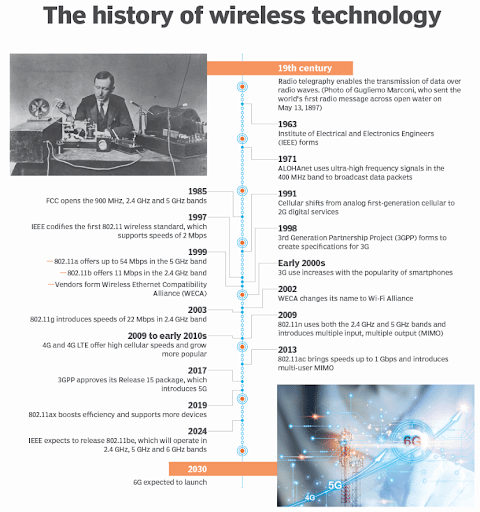
History of Wi-Fi Technology
| Other Relevant Links | |
|---|---|
| Digital India | Quantum computing |
| Project brainwave | Sagar Vani System |
| Locky Ransomware, Petya, WannaCry | Hindi word for computer i.e., “SANGANAK” |
| India’s first technology and innovation support centre (TISC) | Net neutrality |
| National cyber coordination center | Hortnet |
| Digital Transaction Methodologies | Bitcoins |
| Cyber Swachhta Kendra | Bharat Net Project |
| Digital Terrestrial Television Transmission System | Internet of Things |
Wi-Fi Technology – Working Principle
- Electromagnetic waves are used by Wi-Fi to transmit networks.
- To avoid interference and high traffic, these Wi-Fi frequencies are divided into multiple channels.
- When a user connects to the internet via his device, the requested information is converted into binary code.
- With the help of the Wi-Fi chip embedded in your devices, this binary code is further translated into wave frequencies.
- Wi0fi, among all Electromagnetic waves, uses radio waves to transmit information via frequencies between the router and your device.
- Depending on the data being sent, a frequency of 2.4 GHz or 5 GHz is used. The greater the frequency, the more data is transmitted per second.
- The following three media are available for Wi-Fi signal transmission:
- Base station/Ethernet (802.3) connection: This is the primary host network that connects the router to the internet.
- Access point: It accepts wired Ethernet connections and converts them to wireless connections. It then uses radio waves to extend the connection.
- Accessing devices: These are the physical devices that have Wi-fi and allow us to surf the internet.
- These frequencies pass through radio channels and are picked up by Wi-Fi routers connected to your device.
- These frequencies are converted into binary code by the router, which is then translated into the requested internet traffic.
- The data is then received by the router via a hardwired internet cable. This is an extremely fast process.
- The Wi-Fi range is determined by the environment, whether it is indoor or outdoor.
- Wi-Fi cards read the signals and establish an internet connection between the user and the network.
- The speed of the device connected via Wi-Fi increases as the computer gets closer to the main source and decreases as the computer gets further away.
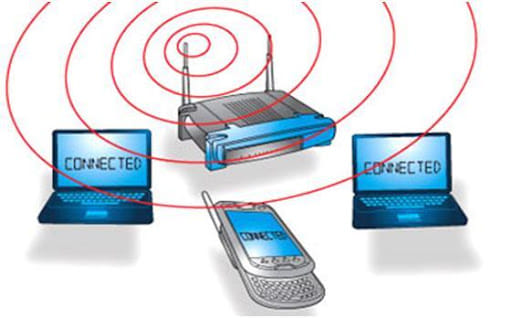
Wi-Fi Working Principle
What is Li-Fi Technology?
|
What is Wi-Fi Hotspot?
- Installing an access point to an internet connection creates a Wi-Fi hotspot.
- A wireless signal is transmitted over a short distance by the access point. It usually covers about 300 feet.
- When a Wi-Fi-enabled device, such as a Pocket PC, comes across a hotspot, the device can wirelessly connect to that network.
- The majority of hotspots are located in public places such as airports, coffee shops, hotels, book stores, and campus environments.
- The most common specification for hotspots worldwide is 802.11b.
- Private internet service providers (ISPs) provide the largest public Wi-Fi networks; they charge users who want to access the internet a fee.
- To connect to some hotspots, a WEP key is required, which is considered private and secure. In terms of open connections, anyone with a Wi-Fi card can connect to that hotspot.
- A mobile hotspot is a standard feature in every smartphone. Once the mobile phone's hotspot is activated, the mobile operator can wirelessly share the network connection with other devices to enable Internet access.
- A useful wi-fi hotspot is a mobile hotspot obtained through a cell phone carrier. It is a portable device that communicates with cellular towers to broadcast signals.
Types of Wi-Fi Standards
| Version | IEEE Standard | Maximum Linkrate (Mbit/s) | Radio Frequency (GHz) |
|---|---|---|---|
| Wi-Fi 6E | 802.11ax | 600 – 9608 | 2.4/5/6 |
| Wi-Fi 6 | 802.11ax | 600 – 9608 | 2.4/5 |
| Wi-Fi 5 | 802.11ac | 433 -6933 | 5 |
| Wi-Fi 4 | 802.11n | 72- 600 | 2.4/5 |
| Wi-Fi 3 | 802.11g | 6- 54 | 2.4 |
| Wi-Fi 2 | 802.11a | 6-54 | 5 |
| Wi-Fi 1 | 802.11b | 1-11 | 2.4 |
| Wi-Fi 0 | 802.11 | 1- 2 | 2.4 |
Application of Wi-Fi
- Wi-Fi enables wireless communication, such as streaming or casting audio or video to any device.
- Wi-Fi is also used to share files, data, and so on between two or more computers or mobile phones.
- Another important feature is the ability to use a Wi-Fi printer to print any document.
- Wi-Fi can also be used as a hotspot to provide Wireless Internet access in a specific location. While the primary network connection is active, users of Wi-Fi-enabled devices can access it through Hotspot, which provides them with temporary internet connectivity.
- Wi-Fi or WLAN technology can also be used to create a point-to-point network. This method can connect two sites that are difficult to reach by wire, such as two corporate office buildings.
- VoWi-Fi, also known as voice-over Wi-Fi, is a useful tool. It allows us to make calls to anyone who is connected to our home Wi-Fi network.
- All computer systems in offices are connected to the Internet via Wi-Fi. There is no need for complicated wiring in the case of Wi-Fi.
- A Wi-Fi cable break does not result in a loss of network connectivity, as a cable break would.
- A city can also provide network connectivity via W-Fi by deploying routers in strategic locations. Schools, colleges, and universities have already implemented Wi-Fi networks due to their flexibility.
- Wi-Fi can be used as a positioning system to recognise a device's area by detecting Wi-Fi hotspots.
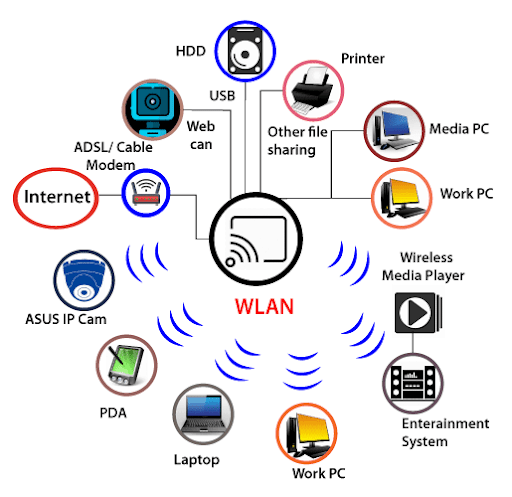
Advantages of Wi-Fi
- Convenience - Because such networks are wireless, users can access network resources from almost any convenient location within their primary networking environment (home or office)
- Mobility - With the advent of public wireless networks, users can now access the internet even when they are not in their usual work environment.
- Productivity - Wireless network users can maintain a nearly constant affiliation with their desired network as they move from location to location.
- Deployment - The initial configuration of an infrastructure-based wireless network requires only a single access point.
- Wired networks, on the other hand, incur the additional cost and complexity of physically running cables to numerous locations (which can be impossible for hard-to-reach locations within a building).
- Expansion - Wireless networks can serve an unexpectedly large number of clients using existing equipment. Additional clients in a wired network would necessitate additional wiring.
- Cost - Wireless networking hardware is only marginally more expensive than wired counterparts. This potentially higher cost is almost always outweighed by the cost and labour savings associated with running physical cables.
Limitations of Wi-Fi
- A Wi-Fi signal's range is limited by obstacles in its path.
- Furthermore, maximum speeds are only possible in areas close to the base station. The maximum speed decreases as the signal quality decreases.
- Wi-Fi is also vulnerable to interference from other devices that use the same frequency. Bluetooth devices, cordless phones, and microwaves are examples of this.
- To minimise interference, it is recommended that these devices be operated at a distance from the base station.
- Concerns about security have stifled Wi-Fi adoption in the business world. Hackers and security consultants have demonstrated how simple it is to circumvent the current security technology known as wired equivalent privacy (WEP), which is used in the majority of Wi-Fi connections.
- Compatibility and Interoperability – It is one of the most significant issues with Wi-Fi. 802.11a products, for example, are incompatible with 802.11b products.
- Different vendors release products that do not work with each other due to a lack of standardisation, harmonisation, and certification.
Conclusion
Wi-Fi is a universal wireless networking technology that transfers data using radio frequencies. Wi-Fi enables high-speed Internet access without the need for cables. Wi-Fi represents freedom from wires. It enables you to connect to the Internet from virtually any location, such as a coffee shop, a hotel room, or a work conference room. Furthermore, it is nearly ten times faster than a standard dial-up connection. Wi-Fi-enabled devices (laptops or PDAs) are required to connect to Wi-Fi. These devices can wirelessly send and receive data in any location with Wi-Fi access.
| Other Relevant Links | |
|---|---|
| Science & Technology Policy in India | Scientific Policy Resolution 1958 |
| Science & Technology Policy of 1983 | Science & Technology Policy of 2003 |
| Science, Technology and Innovation Policy 2013 | New Initiatives Aligned with the National Agenda |
| India and World collaboration in science projects | Technology Vision Document 2035 |
FAQs
Question: What is Wi-Fi technology?
Answer: Wi-Fi (Wireless Fidelity) is a wireless networking technology that allows devices to connect to the internet and local networks without the need for physical cables. It uses radio waves to transmit data, offering convenience and mobility for users in various environments, from homes to offices.
Question: How does Wi-Fi work?
Answer: Wi-Fi works by using a wireless router that is connected to the internet. The router emits radio waves, which are received by Wi-Fi-enabled devices like smartphones, laptops, and tablets. These devices communicate with the router to send and receive data, enabling internet access without wires.
Question: What are the advantages of using Wi-Fi over wired networks?
Answer: Wi-Fi offers several advantages over wired networks, such as greater flexibility and mobility. It eliminates the need for physical cables, allowing users to move freely within a coverage area. Wi-Fi also supports multiple devices simultaneously, providing convenient internet access in public spaces, homes, and offices.
Question: What is the range of a typical Wi-Fi network?
Answer: The range of a typical Wi-Fi network depends on the router’s specifications and environmental factors like walls and interference. Generally, indoor Wi-Fi networks have a range of 30 meters (100 feet), while outdoor networks can cover up to 100 meters (300 feet) under ideal conditions.
Question: What are the security concerns associated with Wi-Fi networks?
Answer: Wi-Fi networks are vulnerable to various security risks such as unauthorized access, data breaches, and malware attacks. To enhance security, it is recommended to use strong passwords, WPA3 encryption, and disable WPS (Wi-Fi Protected Setup). Regularly updating router firmware is also essential for security.
MCQs
1. What does Wi-Fi technology primarily use to transmit data?
A) Fiber optics
B) Radio waves
C) Infrared waves
D) Bluetooth signals
Answer: (B) See the Explanation
Wi-Fi primarily uses radio waves to transmit data. These radio waves are emitted by a wireless router and received by Wi-Fi-enabled devices, allowing them to connect to the internet or local networks wirelessly.
2. Which of the following is a primary advantage of Wi-Fi over wired networks?
A) Higher data transfer speed
B) Flexibility and mobility
C) Cost-effectiveness
D) Greater range
Answer: (B) See the Explanation
The main advantage of Wi-Fi over wired networks is its flexibility and mobility. Users can connect to the internet from various locations within the Wi-Fi coverage area without the need for physical cables, making it ideal for mobile devices.
3. What is the typical range of a Wi-Fi network inside a building?
A) 100 meters
B) 300 meters
C) 10 meters
D) 30 meters
Answer: (D) See the Explanation
The typical range of a Wi-Fi network indoors is about 30 meters (100 feet), depending on factors like router specifications, obstacles, and interference. The range may vary in different environments.
4. Which of the following Wi-Fi encryption standards is considered the most secure?
A) WEP
B) WPA
C) WPA2
D) WPA3
Answer: (D) See the Explanation
WPA3 is the most secure Wi-Fi encryption standard. It offers enhanced protection against brute-force attacks and ensures stronger data encryption, providing better overall security for Wi-Fi networks compared to previous standards like WPA2 and WEP.
5. What should be done to improve the security of a Wi-Fi network?
A) Disable WPA encryption
B) Use weak passwords
C) Regularly update router firmware
D) Enable WPS
Answer: (C) See the Explanation
To improve the security of a Wi-Fi network, it is important to regularly update the router’s firmware, use strong passwords, enable WPA3 encryption, and disable features like WPS that can be vulnerable to attacks.
GS Mains Questions and Model Answers
Q1: Explain the working mechanism of Wi-Fi technology and its applications in modern society.
Answer: Wi-Fi technology operates on radio waves, using a router to transmit data to wireless devices such as smartphones, laptops, and tablets. The technology is based on the IEEE 802.11 standard, which defines the frequency bands, modulation techniques, and protocols for wireless communication. In modern society, Wi-Fi has revolutionized connectivity, enabling mobility and flexibility. It is used in homes, offices, public spaces, and commercial establishments for internet access, video streaming, communication, and work. Wi-Fi networks support multiple devices simultaneously, enhancing productivity and convenience. With the rise of the Internet of Things (IoT), Wi-Fi also facilitates smart home technologies and automation systems.
Q2: Discuss the security challenges associated with Wi-Fi networks and measures to mitigate them.
Answer: Wi-Fi networks are susceptible to several security threats, including unauthorized access, data interception, and brute-force attacks. Common vulnerabilities include weak passwords, outdated encryption standards (WEP), and the presence of unencrypted networks. To mitigate these risks, users should employ strong passwords, disable Wi-Fi Protected Setup (WPS), and use the latest encryption standards such as WPA3. Additionally, regular firmware updates and network monitoring can help detect and prevent unauthorized access. Public Wi-Fi networks should be accessed with caution, using Virtual Private Networks (VPNs) to encrypt traffic and protect data from potential hackers.
Q3: Assess the role of Wi-Fi technology in the development of smart cities and IoT applications.
Answer: Wi-Fi technology plays a crucial role in the development of smart cities and the growth of IoT applications. Wi-Fi offers cost-effective and scalable solutions for connecting devices in a city-wide network, enabling smart infrastructure, transportation, and public services. In smart cities, Wi-Fi facilitates data collection from sensors, providing real-time information for traffic management, waste management, and energy conservation. It also supports applications like smart homes, security systems, and connected devices that improve the quality of life. Wi-Fi is a key enabler of IoT by providing seamless connectivity for millions of devices, driving innovation in sectors such as healthcare, agriculture, and environmental monitoring.
Previous Year Questions on Science and Technology
1. UPSC CSE Prelims 2022:
Question: Which of the following technologies is commonly used for wireless communication in modern networks?
A) Bluetooth
B) Wi-Fi
C) 5G
D) All of the above
Answer: (D)
Explanation: Bluetooth, Wi-Fi, and 5G are all wireless communication technologies used for different purposes. Wi-Fi is primarily used for local area networking and internet connectivity, while Bluetooth is used for short-range communication between devices. 5G is the latest cellular technology used for high-speed mobile internet.
2. UPSC CSE Mains 2021:
Question: Evaluate the impact of Wi-Fi technology on urban connectivity and digital inclusion.
Answer: Wi-Fi technology has significantly impacted urban connectivity by providing easy and affordable internet access to a large population. It has played a critical role in the digital inclusion of underserved and marginalized communities, offering greater opportunities for education, healthcare, and economic growth. Public Wi-Fi initiatives in cities have allowed residents to access government services, participate in online education, and engage in e-commerce, helping bridge the digital divide.
Download the PREPP App and attempt FREE IAS Exam Mock Tests and get complete study material!
UPSC IAS : CSAT - Mini Live Test

Live Test : UPSC CSE Prelims CSAT (Paper-II) (Nov 01 - 04)
Full Test - 05: UPSC CSE Prelims CSAT (Paper-II)
Full Test - 04: UPSC CSE Prelims CSAT (Paper-II)
UPSC CSE Prelims 2026 GS Paper 1 Question Paper (24-May-2026)
UPSC CSE Prelims 2026 CSAT Paper 2 Question Paper (24-May-2026)

17 February 2025 | The Hindu Must Read Articles | Current Affairs

16 February 2026 | The Hindu Must Read Articles | Current Affairs

13 February 2026 | The Hindu Must Read Articles | Current Affairs









Comments