Ransomware: Locky, Petya, WannaCry – Science & Technology Notes
Ransomware like Locky, Petya and WannaCry is a threat to you and your device. The term "ransom" encapsulates everything you need to know about this pest. Ransomware is extortion software that can encrypt your computer and then demand a ransom payment to unlock it. If you want to reduce the likelihood of a ransomware attack, use high-quality ransomware protection software. In this article, we will discuss regarding different types of ransomwares and how to protect against ransomware attack, which will be helpful for UPSC exam preparation.
Table of Contents
Ransomware – Background
- This method of blackmailing computer users is not a 21st-century invention. A primitive form of ransomware was used as early as 1989.
- In Russia, the first concrete cases of ransomware were reported in 2005.
- Since then, ransomware has spread all over the world, with new variants emerging all the time.
- In 2011, there was a significant increase in ransomware attacks.
- In the course of subsequent attacks, antivirus software manufacturers have increasingly focused their virus scanners on ransomware, particularly since 2016.
| Other Relevant Links | |
|---|---|
| Digital India | Quantum computing |
| Project brainwave | Sagar Vani System |
| Hindi word for computer i.e., “SANGANAK” | India’s first technology and innovation support centre (TISC) |
| Net neutrality | National cyber coordination centre |
| Hortnet | Digital Transaction Methodologies |
| Bitcoins | Cyber Swachhta Kendra |
| Bharat Net Project | Wi-Fi Technology |
| Digital Terrestrial Television Transmission System | Internet of Things |
What is a Ransomware?
- Cybercriminals use ransomware as a type of malware (malicious software).
- When ransomware infects a computer or network, it either disables access to the system or encrypts its data.
- In exchange for releasing the data, cybercriminals demand ransom money from their victims.
- A vigilant eye and security software are recommended to protect against ransomware infection.
- After an infection, victims of malware attacks have three options: pay the ransom, attempt to remove the malware, or restart the device.
- Extortion Trojans frequently use the Remote Desktop Protocol, phishing emails, and software vulnerabilities as attack vectors.
- As a result, a ransomware attack can target both individuals and businesses.
Ransomware as a Service (RaaS)
|
Types of Ransomwares
Locker Ransomware
- This type of malware prevents basic computer functions from functioning.
- You may be denied access to the desktop, for example, while the mouse and keyboard are partially disabled.
- This allows you to continue interacting with the ransom demand window in order to make the payment. Aside from that, the computer is unusable.
- But there is some good news: Locker malware usually does not target critical files; instead, it simply wants to lock you out. As a result, complete data destruction is unlikely.
Crypto Ransomware
- Crypto ransomware's goal is to encrypt your important data, such as documents, photos, and videos, while not interfering with basic computer functions.
- This causes panic because users can see but not access their files.
- Crypto developers frequently include a countdown timer with their ransom demand: "If you don't pay the ransom by the deadline, all of your files will be deleted."
- Crypto ransomware can be devastating because many users are unaware of the need for backups in the cloud or on external physical storage devices.
- As a result, many victims pay the ransom just to get their files back.
What is Locky Ransomware?
- Locky is ransomware that was first used in an attack by a group of organised hackers in 2016.
- Locky encrypted over 160 file types and spread via phishing emails with infected attachments.
- Users fell for the email ruse and downloaded ransomware onto their computers.
- This method of spreading is known as phishing, and it is a type of social engineering.
- Locky ransomware specifically targets file types used by designers, developers, engineers, and testers.
- Locky is a ransomware that scrambles the contents of a computer or server (associated network shares, both mapped and unmapped, and removable media) and demands payment to unlock it "usually by anonymous decentralised virtual currency BITCOINS".
- The original files' contents are encrypted (renamed to.locky). To decrypt the files, the compromised user must pay the attacker.
- Locky's primary mode of operation is through spammed emails that include an attachment in the form of a MACRO ENABLED Microsoft Office document file with catchy subject lines.
- Once the MACROS trick is enabled, the embedded downloads Locky, saves it in the Temp folder, and executes it.
- Locky deletes the volume shadow copy files as part of the initial infection process, preventing the system from being restored to a previous steady state.
- At the moment, there is no way to decrypt all of those systems without paying a ransom. Researchers have not discovered a tool capable of unlocking infected computers.
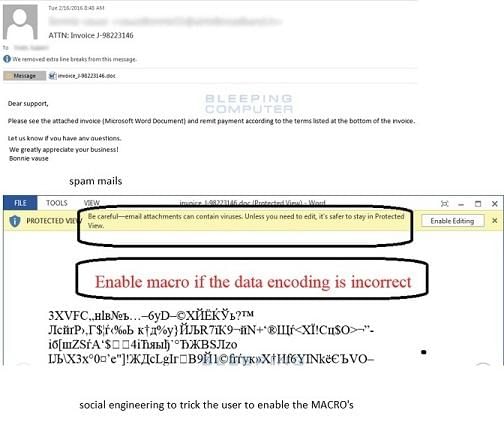
An example of Locky Ransomware
What is Petya Ransomware?
- Petya is a 2016 ransomware attack that was resurrected as GoldenEye in 2017.
- Instead of encrypting specific files, this malicious ransomware encrypted the entire hard disc of the victim.
- This was accomplished by encrypting the Master File Table (MFT), making it impossible to access files on the hard disk.
- Petya ransomware infiltrated corporate HR departments via a bogus app that included an infected Dropbox link.
- Petya 2.0 is a variant of Petya that differs in a few key ways. However, regardless of how the attack is carried out, both are equally fatal to the device.
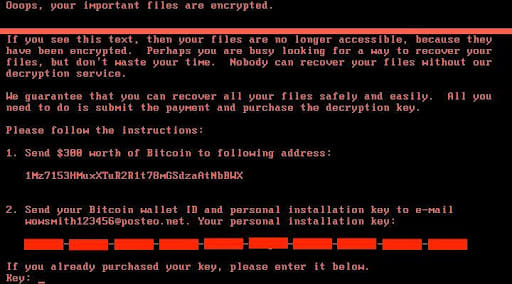
System infected by Petya Ransomware
What is WannaCry Ransomware?
- In 2017, a ransomware attack known as WannaCry spread to over 150 countries.
- It was created by the NSA and leaked by the Shadow Brokers hacker group to exploit a security vulnerability in Windows.
- WannaCry infected 230,000 computers around the world.
- Wannacry encrypts files on infected Microsoft Windows systems. This ransomware spreads by exploiting a vulnerability in Windows Server Message Block (SMB) implementations. Eternal blue is the name of this exploit.
- It encrypts the computer's hard disc drive before spreading laterally between computers on the same LAN. The ransomware is also spread via malicious email attachments.
- The attack targeted one-third of all NHS hospitals in the UK, causing an estimated 92 million pounds in damage. Users were locked out, and a Bitcoin ransom was demanded.
- Because the hacker exploited an operating system vulnerability for which a patch had long been available at the time of the attack, the attack highlighted the issue of outdated systems.
- WannaCry caused approximately $4 billion in global financial damage.
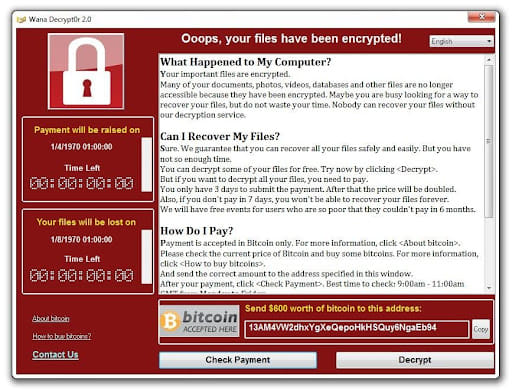
WannaCry ransomware displays this screen on infected system
How to Prevent Ransomware Attack?
Data Backup
- Ransomware's goal is to force the victim to pay a ransom in order to regain access to their encrypted data. This, however, is only effective if the target loses access to their data.
- A solid, secure data backup solution can help you mitigate the effects of a ransomware attack.
- If systems are regularly backed up, the data lost due to a ransomware attack should be minimal or non-existent.
- However, it is critical to ensure that the data backup solution cannot also be encrypted.
- To prevent ransomware from spreading to drives containing recovery data, data should be stored in a read-only format.
Cyber Awareness Training
- Phishing emails are one of the most common ways for ransomware to spread.
- Cybercriminals can gain access to an employee's computer and begin the process of installing and executing the ransomware programme by tricking the user into clicking on a link or opening a malicious attachment.
- Frequent cybersecurity awareness training is critical for defending against ransomware.
Strong and Secure User Authentication
- Remote Desktop Protocol (RDP) and similar tools are commonly used by cybercriminals to gain remote access to an organization's systems using guessed or stolen login credentials.
- Once inside, the attacker can install and execute ransomware on the machine, encrypting the files stored there.
- This potential attack vector can be mitigated by employing strong user authentication.
- Enforcing a strong password policy, requiring multi-factor authentication, and educating employees about phishing attacks designed to steal login credentials are all critical components of a company's cybersecurity strategy.
Up-to-Date Patches
- WannaCry, one of the most well-known ransomware variants, is an example of a ransomware worm.
- Rather than phishing emails or remote desktop connections, WannaCry spreads by exploiting a vulnerability in the Windows Server Message Block (SMB) protocol.
- There was a patch available for the EternalBlue vulnerability used by WannaCry at the time of the famous WannaCry attack in May 2017.
- This patch was made available a month before the attack and was labelled "critical" due to the high risk of exploitation.
- However, because many organisations and individuals did not apply the patch in time, a ransomware outbreak infected 200,000 computers in three days.
- Keeping computers up to date and applying security patches, particularly critical patches, can help to reduce an organization's vulnerability to ransomware attacks.
Anti-Ransomware Solutions
- While the previous ransomware prevention steps can help to reduce an organization's vulnerability to ransomware threats, they do not provide complete protection.
- As an attack vector, some ransomware operators employ well-researched and highly targeted spear phishing emails.
- Even the most diligent employee may be duped by these emails, resulting in ransomware gaining access to an organization's internal systems.
- Protecting against ransomware that "slips through the cracks" necessitates the use of a specialised security solution.
- To accomplish its goal, ransomware must perform unusual actions, such as opening and encrypting large numbers of files.
- Anti-ransomware solutions monitor programmes running on a computer for suspicious ransomware behaviours, and if these behaviours are detected, the programme can take action to stop encryption before further damage is done.
Conclusion
Ransomware attacks take many forms and come in a variety of sizes and shapes. The type of ransomware used is influenced by the attack vector. To estimate the size and scope of the attack, always consider what is at stake or what data could be deleted or published. Regardless of the type of ransomware, backing up data ahead of time and using security software properly can significantly reduce the intensity of an attack.
| Other Relevant Links | |
|---|---|
| Science & Technology Policy in India | Scientific Policy Resolution 1958 |
| Science & Technology Policy of 1983 | Science & Technology Policy of 2003 |
| Science, Technology and Innovation Policy 2013 | New Initiatives Aligned with the National Agenda |
| India and World collaboration in science projects | Technology Vision Document 2035 |
FAQs
Question: What is ransomware?
Answer: Ransomware is a type of malicious software that encrypts a victim's files and demands a ransom payment to restore access to the data.
Question: What is the difference between Locky, Petya, and WannaCry ransomware?
Answer: Locky encrypts files and demands payment in Bitcoin, Petya targets the MBR (Master Boot Record), rendering the computer unbootable, while WannaCry spreads via SMB vulnerabilities and exploits vulnerabilities in Microsoft systems.
Question: How does ransomware spread?
Answer: Ransomware spreads through phishing emails, malicious links, or exploiting software vulnerabilities, such as those in Windows operating systems.
Question: What steps can individuals take to protect against ransomware?
Answer: Individuals can protect against ransomware by using up-to-date antivirus software, avoiding suspicious links or attachments, regularly backing up data, and patching software vulnerabilities.
Question: What should be done if a system is infected with ransomware?
Answer: If infected, the system should be isolated from the network, and law enforcement should be contacted. Do not pay the ransom, and restore files from backups if available.
MCQs
1. What is the primary function of ransomware?
A) To encrypt files and demand payment for decryption
B) To steal sensitive information
C) To disrupt network traffic
D) To disable antivirus software
Answer: (A) See the Explanation
Explanation: Ransomware's primary function is to encrypt a victim's files and demand a ransom payment for the decryption key, effectively holding the victim's data hostage.
2. Which of the following ransomware attacks targets the Master Boot Record (MBR)?
A) Locky
B) Petya
C) WannaCry
D) Zeus
Answer: (B) See the Explanation
Explanation: Petya ransomware specifically targets the Master Boot Record (MBR), rendering the infected computer unbootable until the ransom is paid.
3. How did WannaCry ransomware spread?
A) Through phishing emails
B) By exploiting SMB vulnerabilities in Windows
C) By targeting specific websites
D) Through malicious USB devices
Answer: (B) See the Explanation
Explanation: WannaCry ransomware spread rapidly by exploiting SMB vulnerabilities in Microsoft Windows operating systems, affecting thousands of computers worldwide.
4. What is a common method used by ransomware to demand payment?
A) Cryptocurrency
B) Bank transfers
C) Gift cards
D) Money laundering schemes
Answer: (A) See the Explanation
Explanation: Ransomware often demands payment in cryptocurrency, such as Bitcoin, due to its anonymous nature, making it difficult to trace transactions.
5. Which of the following is an effective way to protect against ransomware?
A) Using outdated software
B) Disabling antivirus software
C) Regularly backing up data
D) Avoiding network firewalls
Answer: (C) See the Explanation
Explanation: Regularly backing up data is an effective way to protect against ransomware, as it allows for the restoration of files without paying the ransom.
GS Mains Questions and Model Answers
Q1: Discuss the impact of ransomware on global cybersecurity and how it can be mitigated.
Answer: Ransomware attacks, such as WannaCry, Petya, and Locky, have had a significant impact on global cybersecurity by crippling critical infrastructure, disrupting businesses, and compromising sensitive data. The widespread nature of these attacks has highlighted vulnerabilities in software and the importance of cybersecurity preparedness. To mitigate ransomware risks, it is essential to implement robust security protocols, including timely software updates, vulnerability patching, and strong encryption practices. Educating individuals about phishing tactics, using multi-factor authentication, and investing in advanced malware protection systems are also critical preventive measures. Additionally, international cooperation is crucial for sharing threat intelligence and responding effectively to ransomware incidents.
Q2: Explain the role of cryptocurrency in ransomware attacks and its implications for cybersecurity law enforcement.
Answer: Cryptocurrency, especially Bitcoin, plays a significant role in ransomware attacks as it allows perpetrators to receive ransom payments anonymously. This complicates law enforcement efforts to trace the criminals and recover the funds. The anonymity and decentralized nature of cryptocurrencies have made them a preferred method for ransomware attackers. This has raised concerns about the effectiveness of current cybersecurity laws and regulations in tackling such crimes. Law enforcement agencies need to adopt new tools and techniques to trace cryptocurrency transactions and collaborate internationally to curb ransomware activities. Strengthening global frameworks for cryptocurrency regulation and enhancing cooperation among agencies can help tackle this issue more effectively.
Q3: What steps can governments take to prevent the spread of ransomware and protect critical infrastructure?
Answer: Governments can take several steps to prevent ransomware attacks and protect critical infrastructure. First, they should enforce strong cybersecurity policies for both public and private sectors, mandating regular security updates and vulnerability patching. Establishing national cybersecurity centers to monitor and respond to emerging threats is also crucial. Public awareness campaigns about ransomware risks, phishing, and safe online practices can reduce the likelihood of successful attacks. Additionally, governments should foster collaboration between cybersecurity experts, law enforcement, and international agencies to create comprehensive strategies for ransomware prevention and response. Encouraging the development of secure, resilient infrastructure and investing in research on advanced security technologies are also vital long-term strategies.
Previous Year Questions on Ransomware
1. UPSC CSE Mains 2019 (GS Paper 2):
Question: "Cyber-attacks, including ransomware, have become a major threat to global security. Discuss the challenges posed by these attacks and the measures that can be taken to counter them."
Answer: Cyber-attacks, including ransomware, present significant threats to global security by disrupting critical infrastructure, stealing sensitive information, and causing financial losses. The challenges include the rapid spread of malware, the difficulty in identifying perpetrators due to anonymized payment methods like cryptocurrencies, and the vulnerability of systems with outdated software. To counter these attacks, governments should enforce strong cybersecurity frameworks, promote international collaboration, and invest in advanced encryption and malware detection systems. Public awareness and education on cybersecurity hygiene are also critical in minimizing the risks posed by cyber threats.
2. UPSC CSE Mains 2021 (GS Paper 3):
Question: "With reference to ransomware attacks, discuss the potential economic and social impacts, and suggest measures for mitigation."
Answer: Ransomware attacks can cause substantial economic losses, as they disrupt business operations, compromise sensitive data, and lead to high recovery costs. Socially, these attacks erode trust in digital systems, causing fear and reluctance to adopt new technologies. To mitigate these impacts, businesses should invest in cybersecurity infrastructure, conduct regular vulnerability assessments, and train employees to identify phishing attempts. Governments must promote public-private partnerships and enhance international cooperation to respond to ransomware threats more effectively. Moreover, strengthening data protection laws and encouraging responsible cybersecurity practices can help reduce the social and economic costs of ransomware attacks.
Download the PREPP App and attempt FREE IAS Exam Mock Tests and get complete study material!
UPSC IAS : CSAT - Mini Live Test

Live Test : UPSC CSE Prelims CSAT (Paper-II) (Nov 01 - 04)
Full Test - 05: UPSC CSE Prelims CSAT (Paper-II)
Full Test - 04: UPSC CSE Prelims CSAT (Paper-II)
UPSC CSE Prelims 2026 GS Paper 1 Question Paper (24-May-2026)
UPSC CSE Prelims 2026 CSAT Paper 2 Question Paper (24-May-2026)

17 February 2025 | The Hindu Must Read Articles | Current Affairs

16 February 2026 | The Hindu Must Read Articles | Current Affairs

13 February 2026 | The Hindu Must Read Articles | Current Affairs









Comments