Internet, Types of Networks and e-Governance – Science & Technology Notes
The Internet is a vast network of autonomous networks linked by globally standardised data communication protocols (primarily Internet Protocol, TCP, UDP, DNS, and BGP). The widespread adoption and use of these protocols brought the world of information and communications closer together than ever before. Millions of digital devices and massive amounts of data, as well as software applications and electronic services, became compatible and interoperable. The Internet gave birth to a new environment, a complex and ever-changing "cyberspace." In this article, we will discuss in detail regarding Internet, Types of Networks and e-Governance which will be helpful for UPSC exam preparation.
Table of Contents
What is Internet?
- The Internet is the world's largest network because it is made up of computers and servers that are linked together globally via routers and switches.
- The Internet functions similarly to a network in a home or office, but with millions more computers, routers, and switches.
- The Internet is a network made up of numerous computer networks. It links LANs, WANs, and even our own computer.
- It's also known as the Information Superhighway. On the Internet, we can access any information from any location at any time.
- We can download research papers to our computers, send emails to friends and family, watch a movie, deposit or withdraw money online, and sell or buy products and services.
- To connect to the Internet, you must use an Internet Service Provider (ISP).
- Every computer on the Internet is referred to as a host.
- ISPs are companies that have permanent Internet connections and charge their customers for access.
| Other Relevant Links | |
|---|---|
| NASA: Asteroid impact and deflection assessment mission | Commercial use of Lithium-Ionbattery technology |
| Hyperspectral imaging satellite | Water propulsion system in CUBESAT |
| Neutrino Observatory | Indian Space Vision-2025 |
| Major Policy Initiatives National Optical Fibre network | Spectrum Management |
| Cyber Law | Spectrum Policy in India |
| Mobile Spectrum | Cloud Computing |
| Big Data | Encryption |
| Biometrics | Virtual Reality |
Objectives of Internet
- It is a valuable asset for communication.
- It enables the user to gain access to useful information.
- It facilitates the purchase and sale of goods and services.
- It contributes to educating the community about what the internet has to offer, and the creation of an environment will bring people with diverse interests and backgrounds together.
- It enables the interconnection and integration of the physical and cyber worlds.
- It is used to coordinate and assist in increasing and optimising the utilisation of results.
- It is useful for sharing text, images, sounds, and videos, as well as exchanging raw data.
- It facilitates global information sharing and communication.
- It is critical for advancing science, medicine, engineering, and design research, as well as maintaining global defence with improved access.
- It not only provides social interaction and entertainment, but also academic and scientific information.
Transmission Control Protocol/Internet Protocol (TCP/IP)
- Transmission Control Protocol/Internet Protocol (TCP/IP) is a set of communication protocols used to connect internet-connected network devices.
- TCP/IP can also be used as a private network communications protocol (intranet or extranet).
- TCP/IP is a routable protocol that can determine the most efficient path through the network.
- TCP/IP refers to the entire internet protocol suite (a set of rules and procedures), though others are included in the suite.
- TCP/IP defines how data is exchanged over the internet by defining how it should be broken into packets, addressed, transmitted, routed, and received at the destination.
- TCP/IP requires little central management and is designed to make networks more reliable by automatically recovering from the failure of any device on the network.
- The internet protocol suite's two main protocols each serve a specific purpose.
- TCP defines how applications can establish communication channels across a network. It also controls how a message is broken down into smaller packets before being sent over the internet and reassembled in the correct order at the destination address.
- IP specifies how to address and route each packet to ensure it reaches its intended destination. This IP address is checked by each gateway computer on the network to determine where to forward the message.
- Since, TCP/IP is non-proprietary, it is not controlled by a single company. As a result, the internet protocol suite is easily modifiable.
Applications/Benefits of Internet
- Individual-to-group communication, group conferencing, tele-meeting services, with interactive multimedia and conferencing, negotiation, decision support systems; mailing lists, list services - for cross-institutional, state, and national research collaboration and distance education.
- Text-based e-mail, multimedia e-mail, email/fax interface, email/EDI interface; news groups/bulletin boards/directories; digital audio and video communication.
- Access to citation databases, full-text databases, and "virtual" libraries containing both text and multimedia information. These databases can be accessed via Internet tools such as Gopher, the World Wide Web, file transfer, remote log-in, resource discovery services, and news gathering agents.
- Remote access to a variety of software programmes, including operations research (OR) tools, statistics, simulation, and visualisation tools.
- Access to printers, fax machines, and rather processing services that allow the utilisation of spare capacity on underutilised machines are examples of resource-sharing services.
- Access to the internet of things (IoT), which enables home appliances and devices to connect and be controlled remotely via a computer or smartphone.
- With cloud storage, you can save data and easily share files.
- The ability to monitor and control personal accounts, such as bank accounts or credit card bills, in real time.
Disadvantages of Internet
- Time wastage: Spending too much time on the Internet using social media apps while doing nothing can reduce your productivity.
- Negative effects on health: If you spend too much time online, you may develop health problems; your body requires outside activities, exercise, and a variety of other things. Long periods of staring at a screen have a negative impact on the eyes.
- Cybercrime: Cybercrime, such as cyberbullying, spam, viruses, hacking, and data theft, is on the rise these days.
- Effects on children: Constant video viewing and gaming on the Internet by young children is detrimental to their social and overall personality development.
- Bullying and negativity spread: Social media applications have provided a free tool to all those people who regularly attempt to spread negativity with truly repulsive and humiliating comments and bully each other, which is wrong and has a negative impact on society.
Social Impact of Internet
- The Internet's social impact can be viewed as both positive and negative.
- On the one hand, some argue that the Internet has increased the risk of isolation, alienation, and withdrawal from society.
- People on the other hand believe that the Internet has had the opposite effect on society, arguing that it increases civic engagement, sociability, and the intensity of relationships.
- Whether the consequences are positive or negative, the Internet has altered the way society interacts and connects.
- One example of change is the increased emphasis on personal development and a decline in a community defined by work, family, and space.
- Individual interests, projects, and values are now being used to build social relationships.
- Like-minded individuals form communities not only offline and in person, but also through the Internet and the plethora of online environments it creates and provides.
- Social networking sites, such as Facebook and LinkedIn, have emerged as the preferred platforms for both businesses and individuals seeking to perform a variety of tasks and communicate with others.
What is a Network?
- The pattern of directions in which information flows in an organisation is defined as a communication network.
- It is a method by which employees in an organisation pass on information to other employees.
- Communication channels (networks through which information flows) can be formal or informal.
- Formal networks are limited to task-related communications and follow the authority chain.
- The informal network (grapevine) can move in any direction, bypass authority levels, and is just as likely to meet group members' social needs as it is to facilitate task completion.
- Networks are the backbone of business today, used for everything from accessing the internet to printing a document to downloading an attachment from an email.
- They can refer to anything from a few devices in a single room to millions of devices spread across the entire globe, and they can be classified based on their purpose and/or size.
Types of Networks
1) Personal Area Network (PAN)
- A PAN is the smallest and most basic type of network, consisting of a wireless modem, one or two computers, phones, printers, tablets, and so on, and revolves around one person in one building.
- These networks are typically found in small offices or homes and are managed by a single person or organisation using a single device.
- Thomas Zimmerman was the first research scientist to propose the Personal Area Network concept.
- Personal Area Networks are classified into two types:
- Wireless Personal Area Network: Wireless Personal Area Networks are created by utilising wireless technologies such as WiFi and Bluetooth. It is a network with a short range.
- Wired Personal Area Network: The USB is used to create a wired personal area network.
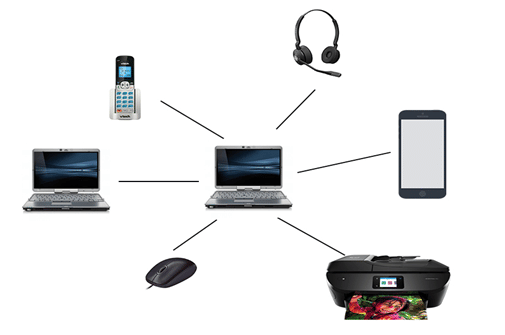
Personal Area Network
2) Local Area Network (LAN)
- It is intended for use in small physical areas such as an office, a cluster of buildings, or a factory.
- LANs are widely used because they are simple to design and troubleshoot.
- LANs connect personal computers and workstations to one another.
- A local area network (LAN) can be as simple as connecting two computers to share files and network, or as complex as interconnecting an entire building.
- LAN networks are also commonly used to share resources such as printers, shared hard drives, and so on.
- Local area networks (LANs) are private networks that are not subject to tariffs or other regulatory controls.
- When compared to a typical WAN, LANs operate at a relatively high speed.
- In a LAN, there are various types of Media Access Control methods, the most common of which are Ethernet and Token Ring.
- It connects computers in a single building, block, or campus, implying that they operate within a specific geographical area.
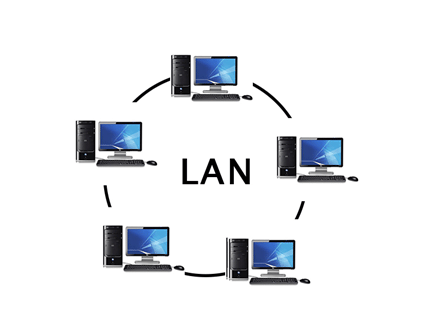
Local Area Network
3) Campus Area Network (CAN)
- These networks are typically found in universities, large K-12 school districts, or small businesses.
- They are larger than LANs but smaller than metropolitan area networks (MAN).
- They can be distributed across several buildings that are relatively close to each other, allowing users to share resources.
4) Metropolitan Area Network (MAN)
- It was created in the 1980s.It is essentially a larger version of LAN.
- It is also known as MAN and employs similar technology to LAN.
- It is intended to cover the entire city.
- It can be a means of connecting several LANs into a larger network or a single cable.
- It is primarily owned and operated by a single private or public company.
- It primarily serves towns and cities (50 km).
- MAN communication mediums include optical fibres, cables, and so on.
- Data rates that are sufficient for distributed computing applications.
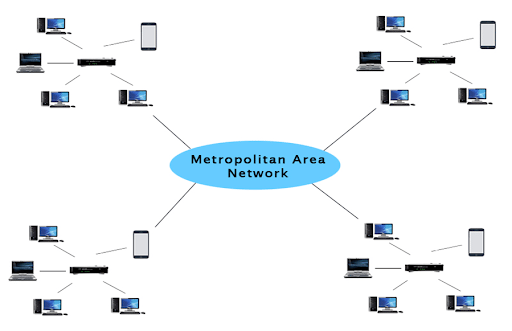
Metropolitan Area Network
5) Wide Area Network (WAN)
- A WAN can be either private or public leased.
- It is used for networks that cover a large area, such as states in a country.
- It is difficult to design and maintain.
- PSTN or satellite links are the communication mediums used by WAN.
- Low data rates are used by WAN.
- It typically spans long distances (states, countries, and continents).
- Satellites and public telephone networks are used as communication mediums, which are linked by routers.
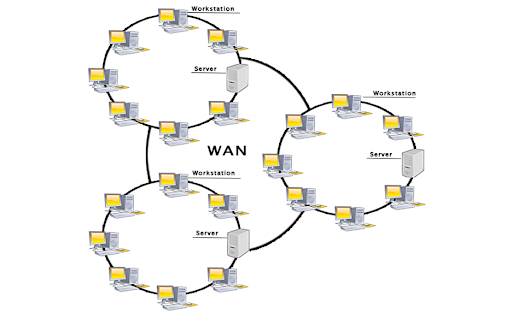
Wide Area Network
6) Wireless Local Area Network (WLAN)
- WLAN is a type of computer network that functions similarly to a local area network but employs wireless network technology such as Wi-Fi.
- This network, unlike LAN, allows devices to communicate wirelessly rather than through physical cables.
- Wi-Fi is the most common example of WLAN.
7) Storage Area Network (SAN)
- SAN is a high-speed computer network that connects groups of storage devices to multiple servers.
- This network is not dependent on a LAN or a WAN.
- A SAN, on the other hand, moves storage resources from the network to its own high-powered network.
- A SAN allows you to access block-level data storage.
- A SAN is an example of a network of discs accessed by a network of servers.
8) System Area Network (SAN)
- A system area network (SAN) is a type of computer network that connects a group of high-performance computers.
- It is a high-bandwidth, connection-oriented network.
- A SAN is a type of LAN that can handle large amounts of data in large requests.
- This network is beneficial for processing applications that necessitate high network performance.
- Microsoft SQL Server 2005 connects to SAN via a virtual interface adapter.
9) Passive Optical Local Area Network (POLAN)
- A POLAN is a type of computer network that functions similarly to a LAN.
- POLAN technology can be integrated into structured cabling to alleviate concerns about traditional Ethernet protocols and network applications like PoE (Power over Ethernet).
- POLAN distributes users and devices by splitting an optical signal from a single strand of single-mode optical fibre into multiple signals using optical splitters.
- POLAN is a point-to-multipoint LAN architecture.
10) Enterprise Private Network (EPN)
- EPN is a type of computer network that is commonly used by businesses that require a secure connection across multiple locations in order to share computer resources.
11) Virtual Private Network (VPN)
- A virtual private network (VPN) is a type of computer network that extends a private network across the internet, allowing users to send and receive data as if they were connected to a private network even when they are not.
- Users can remotely access a private network via a virtual point-to-point connection.
- VPN shields you from malicious sources by acting as a conduit for a secure network connection.
What is e-Governance?
- E-governance, also known as electronic governance, is the integration of Information and Communication Technology (ICT) into all processes with the goal of improving government's ability to meet the needs of the general public.
- The primary goal of e-governance is to simplify processes for everyone, including government, citizens, businesses, and others at the national, state, and local levels.
- It entails digitising and automating various aspects of government, including service delivery, communication, decision-making, and citizen engagement.
- The goal of e-government is to increase the efficiency, transparency, accessibility, and accountability of government services and interactions with citizens.
- It entails the use of online platforms, digital systems, and databases to streamline government processes, improve public service delivery, and enable citizen participation.
- Online portals, digital identity systems, electronic voting, e-taxation, online document submission, and other digital solutions for government operations are examples of e-government initiatives.
- The government intends to increase the coverage and quality of information and services provided to the general public through e-governance by utilising ICT in a simple, cost-effective, and efficient manner.
Objectives of e-Governance
- To assist and simplify government, citizens, and businesses in their governance.
- To increase transparency and accountability in government administration while meeting the needs and expectations of society through efficient public services and effective interaction between people, businesses, and government.
- To reduce government corruption.
- To ensure that services and information are administered as quickly as possible.
- To reduce business difficulties, provide immediate information, and enable digital communication through e-business.
Types of Transactions in e-Governance
G2G (Government to Government)
- G2G interaction occurs when information and services are exchanged within the government's periphery.
- This can be horizontal, i.e., between different government entities, or vertical, i.e., between national, state, and local government entities, as well as within the entity at different levels.
G2C (Government to Citizen)
- G2C interaction refers to interactions between the government and the general public.
- An interface is established between the government and the citizens, allowing citizens to access a wide range of public services.
- Citizens have the right to express their opinions and grievances about government policies at any time and from any location.
G2B (Government to Business)
- In this case, e-governance enables the business class to seamlessly interact with the government.
- It aims to reduce red tape, save time and money, and increase transparency in the business environment when interacting with the government.
G2E (Government to Employees)
- Because the government of any country is the largest employer, it deals with employees on a regular basis, just like any other employer.
- ICT facilitates faster and more efficient interactions between government and employees, while also increasing their level of satisfaction by providing perquisites and add-on benefits.
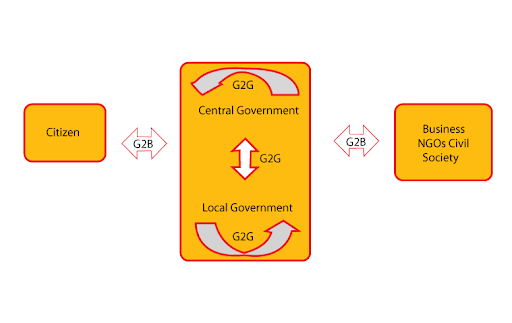
e-Governance Models
Benefits of e-Governance
- Increased efficacy and efficiency: improved government services in terms of achieving government goals and functioning.
- Improved services: E-government can provide stakeholders with quick and timely services.
- Transparency through the dissemination and publication of information on the internet: This facilitates information access and, as a result, holds the system accountable to the public. Furthermore, because the web allows for the free flow of information, it is easily accessible to all without discrimination.
- Easily accessible at any time and from any location: Because e-government services are delivered via web-enabled technology, they can be accessed at any time and from any location.
- ICT-enabled services: The services are primarily aimed at citizens, businesses, and the government itself.
- Cost and time savings: Because the services are delivered via the internet, they are efficient.
- Economic Development: The use of ICTs reduces transaction costs, making services more affordable. Rural areas, for example, suffer from a lack of information about markets, products, agriculture, health, education, weather, and so on, and if all of this information could be accessed online, it would lead to better and more opportunities, and thus prosperity, in these areas.
- Access to information empowers citizens in terms of social development.
- The informed citizens can participate and express their concerns, which can be accommodated in the formulation, implementation, monitoring, and delivery of programs/projects.
- Participation via the internet will counteract the discriminatory factors that influence our societal behaviour.
- Reduced bureaucracy: E-government reduces the hierarchy of authority required to obtain government services.
- Administrative Process Automation: A truly e-governed system would require minimal human intervention and would be system driven.
- Enhanced communication and coordination among government organisations: Because different organisations can access automated services, coordination and further communication became relative.
- Paperwork Reduction: One of the most immediate effects of automation would be a reduction in paperwork. Paperwork is reduced to a greater extent as electronic communication and electronic storage and retrieval of information are enabled.
- Service Quality: ICT enables governments to provide services to citizens with greater accountability, responsiveness, and sensitivity. The quality of services improves because people can now obtain services efficiently and instantly.
- Elimination of Hierarchy: ICT has reduced procedural delays in the organisation caused by hierarchical processes. It is now possible to send information and data across multiple levels of an organisation at the same time using Intranet and LAN.
- System of Strategic Information: The changing organisational environment and increasing competitiveness have put pressure on functionaries' performance. Management must have access to information on all aspects at all times in order to make routine and strategic decisions.
Challenges of e-Governance
- There is a lack of knowledge about the human resource requirements to support the central and state e Governance missions.
- Lack of specific standards and policy guidelines for e-Government.
- Inaccessibility: An e-government site that provides web-based access and support does not always have the potential to reach a large number of users, including those who live in remote areas, have low literacy levels, and live on low incomes.
- Cost: One of the most significant barriers to the implementation of e-governance projects in developing countries such as India is cost. Implementation, operational, and evolutionary maintenance tasks all cost a lot of money.
- Privacy and Security: The privacy and security of an individual's personal data that he or she provides to obtain government services is a critical barrier in implementing e-Government.
- In the domain of e-Governance, there is a lack of emphasis on institutional capacity building.
- Inadequate expertise and skills within state training institutions to lead policymaker training programmes.
- Interoperability is the ability of systems and organisations of varying qualities to work together. This feature must be present in e-Government applications so that new and existing applications can be implemented concurrently.
- Local language: The e-governance applications must be written in the people's native language so that they can use and benefit from them.
- Maintenance Issue: Because information technology changes so quickly, it is difficult for us to keep our existing systems up to date. In a rapidly changing technological environment, maintenance is critical for long-lasting systems.
- Digital Divide: In India, only 30% of the population has access to the internet. The Digital Divide paints a bleak picture of the gender gap in internet access. Only 29% of women have internet access.
- Resistance to Change: Both bureaucracy and people are resistant to new technologies, and e-governance is no exception.
Conclusion
While the Internet enabled new services, capabilities, and unprecedented forms of sharing and cooperation, it also enabled new forms of crime, abuse, surveillance, and social conflict. Internet governance is the process by which participants in cyberspace resolve conflicts over these issues and create a workable order.
| Other Relevant Links | |
|---|---|
| Science & Technology Policy in India | Scientific Policy Resolution 1958 |
| Science & Technology Policy of 1983 | Science & Technology Policy of 2003 |
| Science, Technology and Innovation Policy 2013 | New Initiatives Aligned with the National Agenda |
| India and World collaboration in science projects | Technology Vision Document 2035 |
FAQs
Question: What is the Internet?
Answer: The Internet is a global network of interconnected computers and servers that communicate with each other to share data, information, and services.
Question: What are the different types of computer networks?
Answer: The main types of computer networks are Local Area Network (LAN), Wide Area Network (WAN), Metropolitan Area Network (MAN), and Wireless Local Area Network (WLAN).
Question: What is e-Governance?
Answer: E-Governance refers to the use of Information and Communication Technology (ICT) to deliver government services, information, and processes to citizens, businesses, and other government agencies.
Question: How does a WAN differ from a LAN?
Answer: A LAN (Local Area Network) is a network that connects computers in a small area like a building, while a WAN (Wide Area Network) covers a broader geographical area, often connecting multiple LANs.
Question: What are the key advantages of e-Governance?
Answer: The advantages of e-Governance include improved accessibility, better service delivery, transparency, cost-effectiveness, and greater efficiency in the functioning of government services.
MCQs
1. Which of the following is an example of a Wide Area Network (WAN)?
A) A network connecting all computers in a school
B) A network connecting computers in a single building
C) The Internet
D) A network connecting computers in a local office
Answer: (C) See the Explanation
Explanation: The Internet is an example of a WAN, as it connects computers and networks over vast geographical areas, spanning countries and continents.
2. What does e-Governance aim to improve?
A) Reducing the use of ICT in government
B) Enhancing the role of citizens in governance
C) Making government processes more opaque
D) Reducing transparency in government services
Answer: (B) See the Explanation
Explanation: E-Governance aims to enhance the role of citizens by making government processes more accessible, transparent, and efficient through the use of ICT.
3. Which of the following is a characteristic of a Local Area Network (LAN)?
A) Connects computers over a large geographical area
B) Has a higher data transfer rate than WAN
C) Is typically used for global connectivity
D) Does not require any physical cables
Answer: (B) See the Explanation
Explanation: A LAN typically operates within a small area like a building or campus, and has a higher data transfer rate compared to WAN due to its localized nature.
4. Which of the following is an example of Metropolitan Area Network (MAN)?
A) A university network
B) A city-wide network
C) The Internet
D) A network connecting local offices
Answer: (B) See the Explanation
Explanation: A Metropolitan Area Network (MAN) spans a city or large campus, interconnecting various buildings and offices within that area.
5. What is a key feature of e-Governance?
A) Increasing bureaucracy
B) Enhancing the digital divide
C) Providing better service delivery to citizens
D) Making the government less transparent
Answer: (C) See the Explanation
Explanation: E-Governance improves the delivery of government services to citizens by using digital platforms, thus enhancing accessibility, efficiency, and transparency.
GS Mains Questions and Model Answers
Q1: Analyze the impact of Internet-based governance on public service delivery. How has e-Governance transformed the administrative process in India?
Answer: Internet-based governance, or e-Governance, has significantly transformed public service delivery by making government processes more efficient, transparent, and accessible. Through digital platforms, citizens can access services like applying for passports, filing taxes, and tracking public service delivery. E-Governance has reduced paperwork, corruption, and long waiting times while promoting accountability. In India, initiatives such as the Digital India programme, online ration systems, and e-Vidya programs have facilitated improved access to education, healthcare, and other services in rural areas, contributing to inclusive growth.
Q2: Discuss the different types of computer networks and their role in modern communication systems. Which type of network is most suited for inter-country communication?
Answer: The main types of computer networks include Local Area Networks (LANs), Metropolitan Area Networks (MANs), and Wide Area Networks (WANs). LANs are used for small-scale networks, typically within a building or campus. MANs span larger areas like cities, connecting multiple LANs. WANs cover vast geographical distances, often connecting multiple countries and continents. WANs are most suited for inter-country communication as they enable global connectivity. Examples include the Internet, which serves as the backbone for global data transfer, connecting billions of devices worldwide.
Q3: Evaluate the role of the Internet in enhancing democracy and citizen engagement. How does e-Governance contribute to this process?
Answer: The Internet has played a critical role in enhancing democracy by providing a platform for citizens to voice their opinions, engage with policymakers, and access information. Social media platforms, blogs, and websites allow citizens to participate in public debates and policy discussions. E-Governance takes this further by digitizing government services, making them more accessible and transparent. By providing citizens with online portals to access services, file complaints, and track progress, e-Governance fosters greater public engagement and accountability, ensuring that democratic processes are more inclusive and participatory.
Previous Year Questions on Internet and E-Governance
1. UPSC CSE Prelims 2020:
Question: Which of the following is true about the Internet?
A) It connects computers in a specific location only
B) It is a network of networks
C) It requires specific software to function
D) It connects only mobile phones
Answer: (B)
Explanation: The Internet is a network of networks, interconnecting different types of computer networks and enabling global communication and data exchange.
2. UPSC CSE Mains 2019 (GS Paper 2):
Question: “Explain the concept of e-Governance and its advantages in public administration.”
Answer: E-Governance is the use of digital technologies to provide government services to citizens, improve communication, and streamline administrative processes. It enhances public service delivery by making it more efficient, transparent, and accessible. Some advantages of e-Governance include reduced bureaucratic hurdles, improved citizen satisfaction, transparency, and the ability to monitor and evaluate governmental activities in real-time.
Download the PREPP App and attempt FREE IAS Exam Mock Tests and get complete study material!
UPSC IAS : CSAT - Mini Live Test

Live Test : UPSC CSE Prelims CSAT (Paper-II) (Nov 01 - 04)
Full Test - 05: UPSC CSE Prelims CSAT (Paper-II)
Full Test - 04: UPSC CSE Prelims CSAT (Paper-II)
UPSC CSE Prelims 2026 GS Paper 1 Question Paper (24-May-2026)
UPSC CSE Prelims 2026 CSAT Paper 2 Question Paper (24-May-2026)

17 February 2025 | The Hindu Must Read Articles | Current Affairs

16 February 2026 | The Hindu Must Read Articles | Current Affairs

13 February 2026 | The Hindu Must Read Articles | Current Affairs









Comments