SSC JE City Intimation Slip Out At ssc.gov.in; Check Direct Link & Admit Card
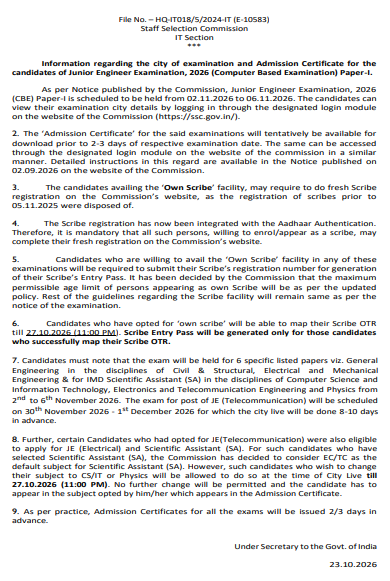
SSC JE City Intimation Slip 2026 began releasing on October 23, 2026, in phases on the official SSC website. Candidates appearing for Paper-I (Civil, Mechanical, Electrical and IMD SA) from November 2 to 6, 2026, can check their allotted exam city using their Registration Number and Password. SSC JE 2026 Admit Card 2026 is expected to be released 2 to 3 days before the respective exam date. As per the revised schedule, the SSC JE Telecom exam will be conducted from November 30 to December 1, 2026.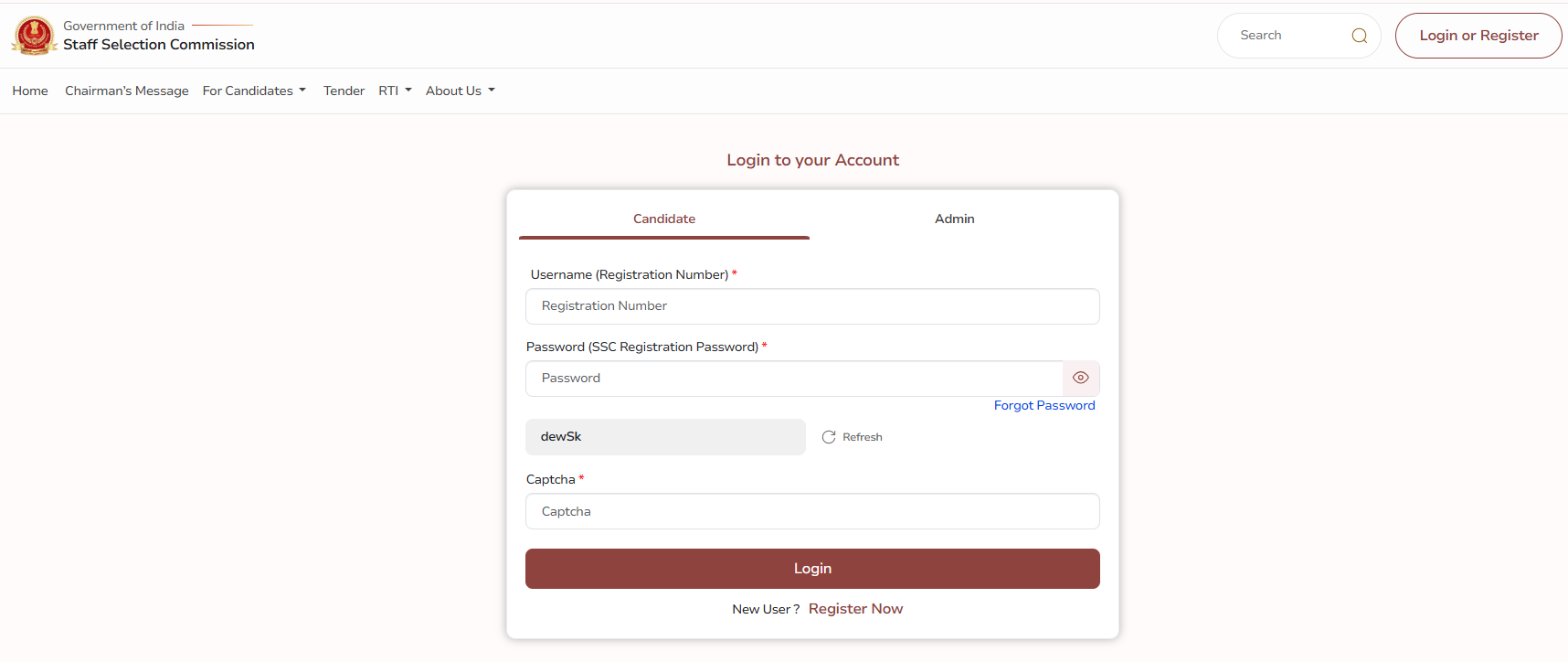
Steps To Check SSC JE City Intimation Slip 2026
SSC JE City Intimation Slip 2026 helps candidates check their allotted exam city before the exam. Follow these steps to view and download the city slip.
- Visit the official SSC website at ssc.gov.in
- Open the login section and enter your Registration Number and Password.
- Find SSC JE City Intimation Slip 2026 link.
- Check your allotted exam city and shift details.
- Download and save the city slip for reference.
SSC JE Tier 1 City Intimation 2026 Date
SSC JE Tier 1 City Intimation Slip 2026 was released on October 23, 2026, for candidates appearing in the Civil & Structural, Electrical & Mechanical, and Scientific Assistant (SA)–IMD exams scheduled from November 2 to 6, 2026. SSC JE Telecom City Intimation Slip 2026 is expected around November 20, 2026, for the exam scheduled from November 30 to December 1, 2026.
Download SSC JE Tier 1 City Intimation 2026 Notice PDF
SSC JE 2026 Important Dates
| Particulars | Details |
|---|---|
| SSC JE Notification 2026 | Sep 2, 2026 |
| Application Process | Sep 2 to 22, 2026 |
| Last Date for Fee Payment | Sep 23, 2026 |
| Application Correction Window | Sep 28 to 30, 2026 |
| Correction Charges | ₹200 for the first correction, ₹500 for the second |
| SSC JE Paper-I | November 2 to 6, 2026 |
| SSC JE City Intimation Slip 2026 | October 23, 2026 |
| SSC JE Admit Card 2026 | 2–3 days before the respective exam date |
| SSC JE Telecom Exam | November 30 to December 1, 2026 |
| SSC JE Paper-II | Dec 2026 (Tentative) |
Note: SSC JE candidates should check SSC JE notification 2026 and SSC website regularly for the latest SSC JE Admit Card 2026 updates. Candidates can download the Admission Certificate online from the official website. It will not be sent by post.
SSC JE Admit Card 2026
SSC JE Admit Card 2026 will be available on the official SSC website 2–3 days before the respective exam date. Candidates can download the admit card using their Registration Number and Password to check their exam date, shift, reporting time, and exam centre details.
Download SSC JE Admit Card 2026 (Link Active Soon)
Steps to Download SSC JE Admit Card 2026
SSC JE candidates can download their Admission Certificate online once it is released by the Commission. Keep the registration ID or roll number and date of birth ready before starting.
- Visit the official SSC website at ssc.gov.in.
- Open the Admit Card section.
- Find the link for SSC JE Tier 1 Admit Card 2026.
- Click on the admit card download link.
- Enter your registration ID or roll number and date of birth.
- Submit the details to access the admit card.
- Check the details mentioned on the admit card carefully.
- Download the admit card and take a printout for the exam day.
Candidates should retain the printed copy of the admit card and keep it ready for the exam. SSC will not send the Admission Certificate by post.
Details Mentioned on SSC JE Admit Card
SSC JE Admit Card will contain the candidate-specific information required for appearing in the computer-based exam as specified under SSC JE Exam Pattern. Candidates should verify these details immediately after downloading the document.
| Particulars | Details |
|---|---|
| Candidate Name | Candidate personal details |
| Roll Number / Registration Details | Exam identification |
| Post Applied For | Confirms the post opted in the application form |
| Exam Date and Shift | Confirms the allotted date and shift |
| Exam Center | Venue details |
| Reporting Time | Exam reporting details |
| Photograph and Signature | Candidate identification |
| Exam Instructions | Guidelines for the exam |
Candidates should report any discrepancy to the concerned SSC Regional Office before the exam. The centre and other instructions printed on the admission certificate should be checked carefully.
Practice: SSC JE Mock Test
Documents to Carry with SSC JE Admit Card
SSC JE 2026 candidates must carry the Admission Certificate and required documents prescribed by SSC. Those without Aadhaar-Based Authentication must report 2 hours early and carry:
- Admission Certificate
- At least 2 recent passport-size colour photographs
- Original valid Photo-ID with DOB matching the Admission Certificate
- Additional original DOB proof if the Photo-ID does not mention DOB
- PwBD/PwD candidates using a scribe: Required Medical Certificate/Undertaking and a photocopy of the scribe’s Photo-ID
Candidates with Aadhaar-Based Authentication do not need recent photographs or original Photo-ID for entry.
Discrepancies in SSC JE Admit Card
SSC JE candidates should check their Admission Certificate for any incorrect or missing information as soon as it is available. Any discrepancy should be reported to the concerned SSC Regional Office before the exam. Candidates should particularly verify:
- Name and personal details
- Roll number and registration details
- Post applied for
- Exam date and shift
- Exam centre and address
- Photograph and signature
- Reporting time and exam instructions
Candidates should get any discrepancy resolved before the exam rather than waiting until the exam day.
SSC JE Admit Card 2026 Download Error: What to Do?
SSC JE 2026 candidates may face login or technical issues while downloading SSC JE Admit Card 2026. Check the following solutions before contacting the Commission.
- Check Login Details: Enter the correct registration ID or roll number and date of birth.
- Use SSC Website: Download the admit card only from the official SSC website.
- Clear Browser Cache: Clear the cache and cookies or try another browser/device.
- Check Website Traffic: Try downloading the admit card later if the website is slow or overloaded.
- Contact SSC: If the issue continues, contact the concerned SSC Regional Office through the official contact details.
SSC JE Tier 1 Exam Centres List 2026
SSC JE Tier 1 city details are available on the officilal site. The slip shows the allotted exam city, while the exact exam centre address and reporting time will be mentioned on the admit card. Candidates cannot generally change their allotted exam centre. Candidates can check the region-wise exam centres and the states and UTs covered in the table below.
| SSC Region | States/UTs Covered | SSC JE Exam Cities |
|---|---|---|
| Central Region (CR) | Bihar, Uttar Pradesh | Bhagalpur, Muzaffarpur, Patna, Gaya, Chapra, Saharsa, Darbhanga, Purnea, Munger, Agra, Bareilly, Gorakhpur, Jhansi, Kanpur, Lucknow, Meerut, Prayagraj, Varanasi |
| Eastern Region (ER) | Andaman & Nicobar Islands, Jharkhand, Odisha, Sikkim, West Bengal | Sri Vijaya Puram (Port Blair), Dhanbad, Jamshedpur, Ranchi, Balasore, Berhampore, Bhubaneswar, Cuttack, Dhenkanal, Rourkela, Sambalpur, Gangtok, Asansol, Kalyani, Kolkata, Siliguri |
| Karnataka Kerala Region (KKR) | Karnataka, Kerala, Lakshadweep | Belagavi, Bengaluru, Hubballi, Kalaburagi, Mangaluru, Mysuru, Shivamogga, Udupi, Ernakulam, Kannur, Kollam, Kottayam, Kozhikode, Thrissur, Thiruvananthapuram |
| Madhya Pradesh Region (MPR) | Madhya Pradesh, Chhattisgarh | Bhopal, Gwalior, Indore, Jabalpur, Satna, Sagar, Ujjain, Bilaspur, Raipur, Durg-Bhilai |
| North Eastern Region (NER) | Arunachal Pradesh, Assam, Manipur, Meghalaya, Mizoram, Nagaland, Tripura | Itanagar, Dibrugarh, Guwahati (Dispur), Jorhat, Silchar, Churachandpur, Imphal, Ukhrul, Shillong, Aizwal, Dimapur, Kohima, Agartala |
| Northern Region (NR) | Delhi, Rajasthan, Uttarakhand | Dehradun, Haldwani, Haridwar, Roorkee, Delhi, Ajmer, Alwar, Bikaner, Jaipur, Jodhpur, Kota, Sri Ganganagar, Udaipur, Sikar |
| North Western Sub-Region (NWR) | Chandigarh, Haryana, Himachal Pradesh, J&K, Ladakh, Punjab | Chandigarh/Mohali, Hamirpur, Shimla, Jammu, Samba, Srinagar, Leh, Amritsar, Jalandhar, Ludhiana, Patiala |
| Southern Region (SR) | Andhra Pradesh, Puducherry, Tamil Nadu, Telangana | Chirala, Cuddapah, Guntur, Kakinada, Kurnool, Nellore, Rajahmundry, Tirupati, Vizianagaram, Vijayawada, Visakhapatnam, Puducherry, Chennai, Coimbatore, Krishnagiri, Madurai, Salem, Tiruchirapalli, Tirunelveli, Vellore, Hyderabad, Karimnagar, Warangal |
| Western Region (WR) | Dadra & Nagar Haveli and Daman & Diu, Goa, Gujarat, Maharashtra | Panaji, Ahmedabad, Anand, Gandhinagar, Mehsana, Rajkot, Surat, Vadodara, Amravati, Aurangabad/Chhatrapati Sambhaji Nagar, Jalgaon, Kolhapur, Mumbai, Nagpur, Nanded, Nashik, Pune |
SSC JE Admit Card 2026 Next Stage of Selection
SSC JE candidates, after downloading the admit card, must appear for Paper-I on the date allotted by the Commission. Candidates who qualify for Paper-I will be issued Admission Certificates for Paper-II. SSC JE 2026 exam will consist of two Computer-Based exam papers.
- Paper I: Computer-Based Exam
- Paper II: Computer-Based Exam
- Document Verification: For candidates shortlisted as per the recruitment process
- Final Selection: Based on performance, merit, preferences, eligibility, and other conditions prescribed by SSC.
SSC JE 2026 will continue through its scheduled exam and selection stages, with further updates related to SSC JE 2026 Cutoff, answer key, and result to be released by the Staff Selection Commission.
| Relevant Link | ||
|---|---|---|
| SSC JE 2026 Result | SSC JE 2026 Answer Key | SSC JE 2026 Previous Year Papers |
| SSC JE 2026 Eligibility | SSC JE 2026 Salary | SSC JE 2026 Syllabus |
SSC JE Admit Card 2026 FAQs
Ques: What should candidates do if they forget their SSC JE registration number?
Ans: Candidates can check their SSC registration details in the confirmation email or SMS received during application. They can also use the available registration recovery option on the SSC website, if provided
Ques: Can candidates change their SSC JE exam centre after the admit card is released?
Ans: Candidates generally cannot change their allotted exam centre after the Admission Certificate is issued. They should contact the concerned SSC Regional Office for clarification in case of a genuine issue.
Ques: Is a digital copy of SSC JE Admit Card accepted at the exam centre?
Ans: SSC JE 2026 candidates should carry a printed copy of the SSC JE Admission Certificate. They should not rely on a digital copy on their mobile phone for entry to the examination centre.
Ques: What happens if a candidate reaches SSC JE exam centre after the reporting time?
Ans: SSC JE 2026 candidates should reach the exam centre within the reporting time mentioned on their Admission Certificate. Late entry may not be permitted after the gate-closing time specified in the exam instructions.
Ques: Can candidates appear for SSC JE Paper-II without qualifying Paper-I?
Ans: No. SSC JE 2026 candidates must qualify Paper-I and meet the shortlisting criteria prescribed by SSC to be eligible to appear for Paper-II.
Download the PREPP App and attempt FREE SSC JE Mock Tests and get complete study material!

Full Test - 15 : SSC JE CE (Paper 1)
Full Test - 14 : SSC JE CE (Paper 1)
SSC JE 2024 CE Paper 1 Question Paper (06-Jun-2024) (Shift-1)
SSC JE 2024 CE Paper 1 Question Paper (06-Jun-2024) (Shift-3)

17 February 2025 | The Hindu Must Read Articles | Current Affairs

16 February 2026 | The Hindu Must Read Articles | Current Affairs

13 February 2026 | The Hindu Must Read Articles | Current Affairs









Comments