
Consider the following Three Address code sample for solving the questions:
100: t1 = y+2
101: initial = x/t1
102: limit = 10
103: if i > j goto 105
104: goto 111
105: if num > b goto 107
106: goto 111
107: num = limit-1
108: b = y+2
109: i = i - num
110: goto 103
111: j = i - num
112: k= j+b
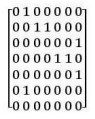
Flow Graph Construction from Three Address Code
This solution explains how to build a control flow graph (CFG) representing the execution path of a given Three Address Code (TAC) snippet. We will analyze the provided TAC step-by-step to identify basic blocks and the control flow between them.
Analyzing the Three Address Code (TAC)
First, let's break down the provided TAC sequence and understand the control flow:
- Line 100: $t1 = y + 2$ - Simple assignment.
- Line 101: $initial = x / t1$ - Simple assignment.
- Line 102: $limit = 10$ - Simple assignment.
- Line 103: $if i > j goto 105$ - Conditional jump. The flow continues to line 104 if the condition $ i > j $ is false, otherwise it jumps to line 105.
- Line 104: $goto 111$ - Unconditional jump. Executes if the condition at line 103 was false.
- Line 105: $if num > b goto 107$ - Conditional jump. The flow continues to line 106 if the condition $ \text{num} > b $ is false, otherwise it jumps to line 107.
- Line 106: $goto 111$ - Unconditional jump. Executes if the condition at line 105 was false.
- Line 107: $num = limit - 1$ - Simple assignment.
- Line 108: $b = y + 2$ - Simple assignment.
- Line 109: $i = i - num$ - Simple assignment.
- Line 110: $goto 103$ - Unconditional jump. Creates a loop by redirecting flow back to line 103.
- Line 111: $j = i - num$ - Simple assignment.
- Line 112: $k = j + b$ - Simple assignment. This is the final statement.
Identifying Basic Blocks
Basic blocks are sequences of consecutive statements executed together. Control enters at the start and leaves at the end without branching within the block.
The identified basic blocks are:
- Block 1: Lines {100, 101, 102}.
- Block 2: Line {103}.
- Block 3: Line {104}.
- Block 4: Line {105}.
- Block 5: Line {106}.
- Block 6: Lines {107, 108, 109}.
- Block 7: Line {110}.
- Block 8: Lines {111, 112}.
Constructing Control Flow Edges
The directed edges show the possible transitions between blocks:
- Block 1 $ \rightarrow $ Block 2 (Sequential flow from 102 to 103).
- Block 2 $ \rightarrow $ Block 4 (True branch of $if i > j$).
- Block 2 $ \rightarrow $ Block 3 (False branch of $if i > j$).
- Block 3 $ \rightarrow $ Block 8 (Unconditional jump $goto 111$).
- Block 4 $ \rightarrow $ Block 6 (True branch of $if num > b$).
- Block 4 $ \rightarrow $ Block 5 (False branch of $if num > b$).
- Block 5 $ \rightarrow $ Block 8 (Unconditional jump $goto 111$).
- Block 6 $ \rightarrow $ Block 7 (Sequential flow from 109 to 110).
- Block 7 $ \rightarrow $ Block 2 (Unconditional jump $goto 103$), forming the loop.
Flow Graph Visualization
This derived structure, including the sequence, conditional decision points (nodes 103 and 105), the exit paths (leading to node 111), and the loop back to node 103, matches the graph shown in Option 1.
The correct flow graph is:
Important Questions from Code Optimization
Consider the control flow graph given below.
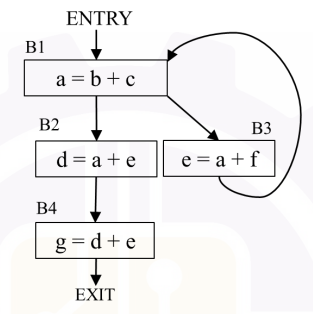
Which one of the following options is the set of live variables at the exit point of each basic block?Consider the control flow graph shown in the figure.
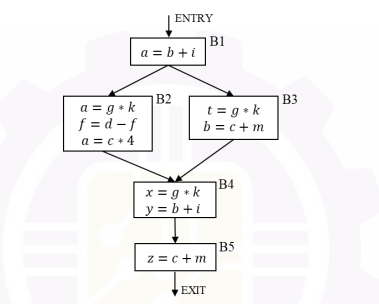
Which one of the following options correctly lists the set of redundant expressions (common subexpressions) in the basic blocks B4 and B5?
Note: All the variables are integers.- Which of the following is the correct High level code for the given TAC in the passage
- What are the various LEADERS (leading statements) for the TAC given in the passage?
- What all blocks does Block 3 & Block 5 dominate in the Flow graph for the TAC given in the passage?


