_______ is a device that combines a large number of low speed transmission lines into a high speed line.
Multiplexer
Understanding Devices for Transmission Lines
The question asks about a device that takes multiple low-speed transmission lines and combines them into a single high-speed line. This process is fundamental in data communication and networking to efficiently utilize bandwidth.
Analyzing the Options
Let's look at the functions of the devices listed in the options:
- Demultiplexer: A demultiplexer (Demux) performs the opposite function of a multiplexer. It takes a single high-speed input line and separates it into multiple low-speed output lines. Think of it as a distributor.
- Switch: A switch operates within a network (like a LAN) to forward data frames based on MAC addresses. It connects multiple devices and routes data between them, but its primary function is not combining low-speed lines into one high-speed line in the sense of multiplexing signals.
- Repeater: A repeater is a device that regenerates or amplifies a signal on a network cable to extend the transmission distance. It boosts the signal strength but does not combine multiple lines.
- Multiplexer: A multiplexer (Mux) is a device that selects one of several analog or digital input signals and forwards the selected input into a single line. In data communication, a multiplexer combines multiple low-speed digital signals into one high-speed digital signal for transmission over a shared medium. This technique is called multiplexing.
Identifying the Correct Device
Based on the definitions, the device that specifically combines a large number of low speed transmission lines into a high speed line is a multiplexer.
A multiplexer allows multiple data streams to be transmitted simultaneously over a single communication channel, increasing the efficiency of the transmission system.
Revision Table: Network Devices
| Device | Primary Function | Input/Output Relation |
|---|---|---|
| Multiplexer (Mux) | Combines multiple low-speed lines into one high-speed line. | Many inputs, One output |
| Demultiplexer (Demux) | Separates one high-speed line into multiple low-speed lines. | One input, Many outputs |
| Repeater | Regenerates/amplifies network signal. | One input, One output (signal regenerated) |
| Switch | Forwards data frames between devices in a network segment. | Multiple inputs, Multiple outputs (selective forwarding) |
Additional Information on Multiplexing
Multiplexing is a technique used in telecommunications and computer networks to transmit multiple data streams over a single communications channel. There are different types of multiplexing, including:
- Frequency Division Multiplexing (FDM): Divides the available bandwidth of a single channel into multiple frequency bands, each used for a separate signal.
- Time Division Multiplexing (TDM): Divides the time available on a channel into slots, assigning each slot to a different signal.
- Wavelength Division Multiplexing (WDM): Similar to FDM but used with optical fiber, where different wavelengths (colors) of light carry different signals.
Multiplexers are essential for making efficient use of communication channels, especially for long-distance transmission where the cost of laying multiple lines would be prohibitive.
Important Questions from Multiplexer
________ is used to carry digital data on analog lines.
Which of the following can be used as a parallel to series converter?
Number of control lines required for 16 to 1 multiplexer is
In a multiplexer, if there are 4 input lines and 1 output line, then number of selection lines will be:
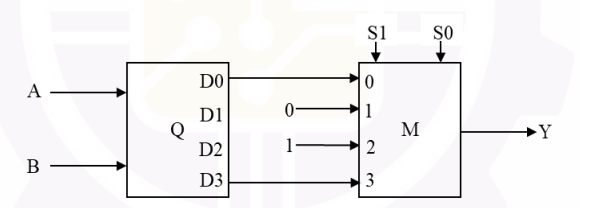
Consider the digital circuit shown below with two input lines A and B, two select lines S0 and S1, and an output line Y. The blocks Q and M represent active high 2:4 decoder and 4-to-1 multiplexer, respectively. Out of 16 possible input combinations, the number of combinations that produce Y=1 is ____________. (answer in integer)
Note: One input combination is an instance of [A B S1 S0].