
An organization is granted the block 130.56.0.0/16. The administrator wants to create 1024 subnets. Find the subnet prefix.
130.56
Understanding Subnetting for Network Blocks
The question asks us to determine the subnet prefix for a network block 130.56.0.0/16 that needs to be divided into 1024 subnets. Let's break down the process of subnetting and what the resulting subnet prefix means.
The initial network block is 130.56.0.0/16.
- The number 130 identifies the class of the network address. In this case, 130 falls between 128 and 191, which is characteristic of a Class B network.
- For a Class B network, the default subnet mask is 255.255.0.0, corresponding to a /16 prefix. This means the first 16 bits of the IP address are used for the network portion, and the remaining 16 bits are used for the host portion.
- In the address 130.56.0.0/16, the network part is represented by 130.56. The 0.0 part represents the host portion.
Calculating Required Subnet Bits
The administrator wants to create 1024 subnets from this block. To find out how many bits are needed to create 1024 subnets, we use the formula:
\(\text{Number of subnets} = 2^n\)
Where \(n\) is the number of bits borrowed from the host portion to create subnets.
We need 1024 subnets, so we have:
\(1024 = 2^n\)
To find \(n\), we can take the logarithm base 2 of 1024, or simply recognize the powers of 2:
- \(2^1 = 2\)
- \(2^2 = 4\)
- ...
- \(2^{10} = 1024\)
So, \(n = 10\). This means we need to borrow 10 bits from the host portion of the address to create 1024 subnets.
Determining the New Subnet Prefix
The original network block had a prefix length of /16, meaning the first 16 bits identified the network. The host portion had 16 bits (32 total bits in an IPv4 address - 16 network bits = 16 host bits).
By borrowing 10 bits from the host portion for subnetting, these 10 bits now become part of the network (or subnet) identifier. The new prefix length is the original network prefix length plus the number of bits borrowed for subnetting.
\(\text{New prefix length} = \text{Original prefix length} + \text{Number of subnet bits}\)
\(\text{New prefix length} = 16 + 10 = 26\)
So, the new subnet prefix for each of the 1024 subnets will be /26.
Analyzing the Address Structure with Subnetting
The original /16 block had the structure:
| Octet 1 (8 bits) | Octet 2 (8 bits) | Octet 3 (8 bits) | Octet 4 (8 bits) |
| Network (16 bits) | Host (16 bits) | ||
| 130 | 56 | 0 | 0 |
After borrowing 10 bits for subnetting, the structure becomes:
| Octet 1 (8 bits) | Octet 2 (8 bits) | Octet 3 (8 bits) | Octet 4 (8 bits) |
| Network (16 bits) | Subnet (8 bits) | Subnet (2 bits) | |
| Host (0 bits) | Host (6 bits) | ||
| Network Part (16 bits) | Subnetted Part (10 bits Subnet + 6 bits Host = 16 bits total) | ||
| 130 | 56 | ... (part of subnet ID) | ... (part of subnet ID and host ID) |
The first 16 bits, corresponding to 130.56, remain the network portion that identifies the original block. Every subnet created from this block will start with 130.56.
The question asks for the "subnet prefix", and the options provide parts of IP addresses. Given the options, it seems the question is asking to identify the fixed part of the IP address that forms the basis of these subnets, which is the original network identifier.
The first 16 bits (130.56) define the network that is being subnetted. All subnets derived from 130.56.0.0/16 will have 130.56 as their network identifier part.
Conclusion on Subnet Prefix Identification
While the true subnet prefix length is /26, the options provided are not prefix lengths or full subnet addresses. They appear to be asking for the common network identifier portion shared by all these subnets. This fixed portion is the original network address part, 130.56.
Let's look at the options:
- 130.56: This matches the original network portion of the address.
- 136.0: This is a different network address.
- 136.255: This is part of a different network address.
- 136.56.255: This is part of a different network address.
The only option that represents the fixed identifier for all subnets created from 130.56.0.0/16 is 130.56.
Therefore, the subnet prefix, in the sense of the shared network identifier across all derived subnets, is 130.56.
Revision Table: Key Subnetting Concepts
| Concept | Description | Example (using 130.56.0.0/16) |
|---|---|---|
| Network Address | Identifies the network itself, with all host bits set to 0. | 130.56.0.0 |
| Prefix Length (/n) | Indicates the number of bits used for the network portion of the address. | /16 (for the original block) |
| Subnetting | Dividing a larger network block into smaller subnetworks. | Creating 1024 subnets from 130.56.0.0/16 |
| Subnet Bits | Bits borrowed from the host portion to identify subnets. | 10 bits needed for 1024 subnets (\(2^{10} = 1024\)) |
| New Subnet Prefix | The prefix length after including the subnet bits. | /26 (16 original network bits + 10 subnet bits) |
| Subnet Address | Identifies a specific subnet, with host bits set to 0 within that subnet. Starts with the original network part. | Example subnet addresses would start with 130.56.xxx.yyy |
Additional Information on IP Subnetting
IP subnetting is a fundamental technique in network administration used for several reasons:
- Efficiency: It helps in efficiently using the allocated IP address space by breaking down large networks into smaller, manageable subnets.
- Organization: It allows administrators to logically group hosts based on location, department, or function, simplifying network management.
- Security: Subnetting helps in controlling network traffic and implementing security policies by isolating different parts of the network.
- Performance: Reducing the size of broadcast domains improves network performance by limiting the scope of broadcast messages.
When you subnet a network, the original network portion of the address (defined by the initial prefix length) remains constant for all the new subnets. The bits borrowed from the host portion are used to create unique identifiers for each subnet. The remaining host bits in each subnet are then used to assign unique IP addresses to devices within that specific subnet.
In our example, the original network 130.56.0.0/16 means all addresses starting with 130.56 belong to this network block. When we subnet it into /26 subnets, each of these /26 subnets will still be part of the larger 130.56.0.0/16 block and thus will have 130.56 as the initial part of their address.
Important Questions from IPv4
An organization is granted the block 130.56.0.0/16. The administrator wants to create 1024 subnets. Find first and last addresses of last subnet.
1.
130.56.0.0
130.56.254.255
2.
130.56.255.0
130.56.255.255
3.
130.56.0.192
130.255.255.255
4.
130.56.255.192
130.56.255.255
An organization is granted the block 130.56.0.0/16. The administrator wants to create 1024 subnets.
Find first and last addresses of First subnet.
1.
130.56.0.0
130.56.254.254
2.
130.56.0.0
130.56.0.63
3.
130.0.0.0
130.255.255.255
4.
130.56.0.0
130.56.255.63
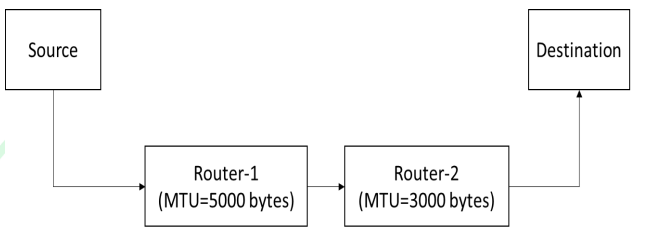
Suppose a message of size 15000 bytes is transmitted from a source to a destination using IPv4 protocol via two routers as shown in the figure. Each router has a defined maximum transmission unit (MTU) as shown in the figure, including IP header. The number of fragments that will be delivered to the destination is ________ . (Answer in integer)
- A machine receives an IPv4 datagram. The protocol field of the IPv4 header has the protocol number of a protocol X.
Which ONE of the following is NOT a possible candidate for X? - Consider a network that uses Ethernet and IPv4. Assume that IPv4 headers do not use any options field. Each Ethernet frame can carry a maximum of 1500 bytes in its data field. A UDP segment is transmitted. The payload (data) in the UDP segment is 7488 bytes.
Which ONE of the following choices has the CORRECT total number of fragments transmitted and the size of the last fragment including IPv4 header?


