
IBPS RRB Clerk Form Correction 2026; Check Dates, Fees & Steps to Edit
IBPS conducted the CRP RRBs XV online application process from September 1 to September 27, 2026. Candidates who successfully submitted their applications with the required fee can edit their forms from October 7 to October 8, 2026, for IBPS RRB Clerk 2026. A correction fee of Rs. 200, inclusive of GST, will apply to all candidates. The corrected application can be submitted only once. Candidates should carefully verify all details before submission, as no changes will be allowed after the Edit Window closes.
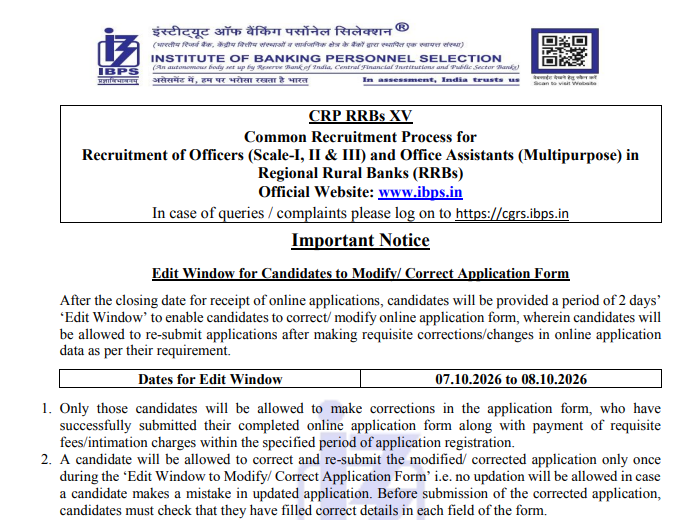
IBPS RRB Clerk 2026 Application Form Edit Window
IBPS RRB Clerk 2026 Edit Window allows candidates to modify only the permitted fields in their submitted application. The correction facility can be accessed through the CRP RRBs section using the required login credentials. The editable and non-editable fields are given below.
Edit RRB Clerk 2026 Application Form (Link Active)
Steps To Edit IBPS RRB Clerk Application Form 2026
IBPS RRB Clerk 2026 candidates can follow the steps below to edit their IBPS RRB Clerk application form:
- Visit the official IBPS website at ibps.in.
- Click on the CRP RRBs section.
- Select Common Recruitment Process – Regional Rural Banks Phase XV.
- Open the IBPS RRB Clerk application form edit window.
- Log in using the Registration Number, Password or Date of Birth.
- Edit the permitted details carefully.
- Pay the Rs. 200 correction fee through the available online payment mode.
- Review the changes and submit the corrected application form.
- Save a copy of the updated application form for future reference.
IBPS RRB Clerk Form Correction 2026: Editable Fields
IBPS RRB Clerk 2026 candidates can make changes to the following details during the correction window:
- Category
- Educational qualification, marks, and percentage
- Photograph
- Signature
- Left thumb impression
- Handwritten declaration
- Gender
- Marital status
- Date of birth
IBPS RRB Clerk Form Correction 2026: Non-Editable Fields
In IBPS RRB Clerk 2026, the following details cannot be changed during the correction window:
- Candidate’s name
- Registered email ID
- Mobile number
- State/UT selected for vacancy
- State/UT in correspondence address
- State/UT in permanent address
- Post applied for
- Nationality
IBPS RRB XV Category Correction 2026
Candidates can modify their category during the IBPS RRB XV Edit Window as per the permitted combinations given below:
| Earlier Category | Permitted Category |
|---|---|
| SC/ST/PwBD | SC/ST/PwBD |
| GEN/EWS/OBC (NCL) | GEN/EWS/OBC (NCL)/SC/ST/PwBD |
IBPS RRB Clerk 2026 Application Form
\IBPS RRB Clerk 2026 application form was available online from September 1 to September 27, 2026, under CRP RRBs-XV. Eligible candidates under IBPS RRB Clerk eligibility criteria must register online, fill in the application form, upload the required documents, pay the application fee, and complete the final submission through the official IBPS website. No other mode of application will be accepted.
Steps To Apply Online for IBPS RRB Clerk 2026
- Visit ibps.in and open the CRP for RRBs section.
- Click the online application link for Office Assistants (Multipurpose).
- Register using the required basic details and note the Registration Number and Password.
- Fill in personal and educational details.
- Upload the required photograph, signature, thumb impression, handwritten declaration, and certificates.
- Select the State/UT for provisional allotment.
- Review the application and make the fee payment.
- Submit the application and download the confirmation page and e-receipt for future reference.
Note: Name, email ID, mobile number, State/UT, post, and nationality cannot be changed after submission.
IBPS RRB Clerk 2026 Vacancy Increased
IBPS RRB Clerk Office Assistant vacancies have been increased from 8,183 to 8,222, adding 39 vacancies to the recruitment. The revised vacancies have been notified through the latest update, while the application dates and other recruitment details remain unchanged.
Download IBPS RRB Clerk 2026 Vacancy Increased Notification PDF
IBPS RRB Clerk 2026 Important Dates
| Particulars | Tentative / Official Date |
|---|---|
| Online Registration | September 1 to September 27, 2026 (Extended) |
| Application Fee Payment | September 1 to September 27, 2026 |
| Edit/Correction Window | October 7 to 8, 2026 |
| Pre-Exam Training (PET) | November 2026 |
| Prelims Exam Call Letter | November/December 2026 |
| IBPS RRB Clerk Prelims Exam | December 6, 12, and 13, 2026 |
| Prelims Exam Result | December 2026 / January 2027 |
| Main Exam Call Letter | December 2026 / January 2027 |
| IBPS RRB Clerk Main Exam | January 30, 2027 |
| Provisional Allotment | February / March 2027 |
Note: IBPS 2026-27 calendar confirms that the Office Assistant Prelims exam will be conducted. The main exam is scheduled for January 30, 2027.
IBPS RRB Clerk Application Fee 2026
IBPS RRB Clerk 2026 candidates have to pay the application fee/intimation charges online between Sep 1 and Sep 21, 2026.
| Category | Application Fee |
|---|---|
| SC/ST/PwBD/ESM/DESM | ₹175 |
| Other Candidates | ₹850 |
IBPS RRB Clerk 2026 Accepted Payment Modes
IBPS RRB Clerk 2026 application fee can be paid through the online payment gateway integrated with the application form. Candidates can use debit cards (RuPay/Visa/MasterCard/Maestro), credit cards, internet banking, IMPS, cash cards, or mobile wallets for making the payment. After successful payment, an e-receipt will be generated. Candidates should take a printout of the e-receipt and application form containing the fee details. If the e-receipt is not generated, the transaction may not have been successful.
Documents Required for IBPS RRB Clerk Application Form 2026
IBPS RRB Clerk 2026 candidates have to upload the documents specified in the CRP RRBs-XV notification while completing the online application. Candidates should keep the required documents ready before starting the registration process. The documents required include:
- Recent photograph
- Signature
- Left thumb impression
- Handwritten declaration
- SSC/SSLC/10th Standard or equivalent certificate
- Certificate/UDID card, wherever applicable
- Other prescribed certificates, wherever applicable
Candidates will also have to capture and upload their photograph through a webcam or mobile phone during registration. All documents must be uploaded according to the specifications given in Annexure III: Guidelines for Scanning and Upload of Documents.
IBPS RRB Clerk 2026 Photo & Signature Requirements
IBPS RRB Clerk 2026 candidates should ensure that the uploaded photograph, signature, left thumb impression, handwritten declaration and certificates are clear and not smudged or blurred. An unclear or blurred document may result in rejection of the application. The notification also specifies that the photograph should be recent and recognizable, measuring 4.5 cm × 3.5 cm. Candidates must retain copies of the same photograph for use during the selection process. The handwritten declaration must be written by the candidate in English and in their own handwriting and should not be written in capital letters.
Can I Apply for IBPS RRB Clerk and Officer Posts Together?
IBPS RRB 2026 candidates may apply for one Office Assistant (Multipurpose) and one Officer post, but only one among Officer Scale-I, Scale-II, or Scale-III. Separate applications and fees are required for each position. Submitting multiple applications for the same cadre is prohibited. Only the most recent valid application will be accepted, and fees for other submissions will be forfeited. Only the most recent valid application will be accepted, and fees for other submissions will be forfeited. The Office Assistant post offers the prescribed IBPS RRB Clerk 2026 salary and allowances as per IBPS RRB norms.
IBPS RRB Clerk Login and Password Recovery 2026
- IBPS RRB Clerk candidates can recover their credentials through the IBPS candidate portal if they forget their registration number or password.
- Forgot Password: Use the option available on the candidate login page
- Verification: The registered mobile number and email ID are used for verification and must stay active
- Queries and Complaints: Log in to the IBPS grievance portal at cgrs. ibps.in
- Updates: Check ibps.in regularly for call letters, results, and corrigenda
Common Errors While Applying for IBPS RRB Clerk 2026
IBPS RRB Clerk 2026 candidates should carefully check all details before submitting the application form. Incorrect information, unclear documents or unsuccessful fee payment can create problems during the recruitment process.
| Mistake | How to Avoid It |
|---|---|
| Entering incorrect personal details | Cross-check the details with the original documents. |
| Providing an inactive email ID or mobile number | Use active contact details throughout the recruitment process |
| Uploading an incorrect photograph | Follow the photograph specifications prescribed by IBPS |
| Uploading an unclear signature | Upload a clear signature in the required format |
| Entering incorrect educational details | Verify details with the original certificates |
| Selecting incorrect information | Review the complete form before submission |
| Unsuccessful fee payment | Check the payment status before closing the application |
| Not saving the application | Download and retain the submitted form and payment receipt |
| Missing the deadline | Submit the application before the last date |
Note: IBPS RRB Clerk 2026 candidates should carefully check all details before submitting the application form and refer to IBPS RRB Clerk exam pattern and syllabus while starting their preparation.
Next Steps After IBPS RRB Clerk 2026 Application
IBPS RRB Clerk 2026 candidates should regularly check the official IBPS website after submitting the application form for updates related to the recruitment process. The official calendar confirms that the Prelimsexam will be held on December 6, 12 and 13, 2026, followed by the main exam on Jan 30, 2027. Candidates should keep track of the following updates:
- Release of IBPS RRB Clerk 2026 Admit Card
- Prelims exam
- Prelim Exam Result
- Main exam
- Main Exam Result
- Provisional Allotment/Final Selection
IBPS RRB Clerk 2026 candidates should complete the application process within the deadline and keep their registration details safe. After the exam, candidates can follow updates on the IBPS RRB Clerk result and other recruitment stages.
IBPS RRB Clerk Application Process 2026 FAQs
Ques: Can I use DigiLocker while filling IBPS RRB Clerk application form?
Ans: Yes, candidates can voluntarily use DigiLocker during the IBPS RRB Clerk application process to provide Aadhaar, educational certificates, and other required credentials.
Ques: What details cannot be changed after submitting IBPS RRB Clerk application?
Ans: Candidates cannot change their name, email ID, mobile number, state/UT, post, or nationality after submitting the application form. Candidates should verify these details carefully before final submission.
Ques: Is the live photograph mandatory in IBPS RRB Clerk application?
Ans: Yes, candidates have to capture and upload a live photograph using a webcam or mobile phone while completing the IBPS RRB Clerk application.
Ques: Can I apply for another RRB Office Assistant post after submitting IBPS RRB Clerk form?
Ans: No, candidates cannot submit multiple applications for the same Office Assistant cadre. If multiple applications are submitted, only the most recent valid application will be considered.
Ques: What happens if I do not receive IBPS RRB Clerk e-receipt after fee payment?
Ans: If the e-receipt is not generated after payment, the transaction may not have been successful. Candidates should check their payment status before closing the application process and avoid assuming that the form has been successfully submitted.
Download the PREPP App and attempt FREE IBPS RRB Clerk Mock Tests and get complete study material!


Comments