
Select the option figure which is embedded in the given figure. (Rotation is NOT allowed)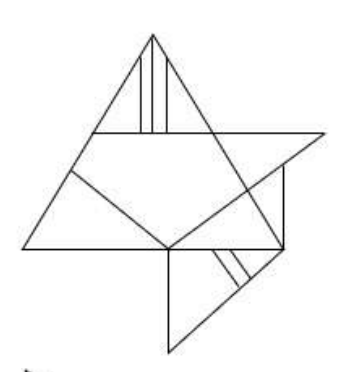
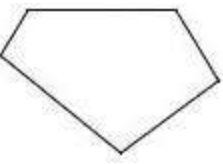
To solve this problem, we need to determine which option figure is embedded in the given figure without rotating the options.
Here are the steps to identify the embedded figure:
- Examine the given figure carefully, noting distinctive lines and shapes.
- Compare each option with parts of the given figure. Pay attention to angles, lengths, and patterns.
- Look for a section of the given figure that exactly matches one of the options, ensuring no rotation is involved.
After analyzing the options and comparing them with the given figure:
The correct answer is the option represented by the image above. This matches a part of the given figure exactly without any rotation.
Thus, the solution is to identify Option 2 as the embedded figure.
Important Questions from Hidden Image
Select the option in which the given figure is embedded (rotation is NOT allowed).

Select the option in which the given figure is embedded.

Select the option in which the given figure is embedded (rotation is NOT allowed).

Select the option in which the given figure is embedded (rotation is NOT allowed).

Select the option figure in which the given figure is embedded (rotation is NOT allowed).



