
Select the option figure in which the given figure is embedded (rotation is NOT allowed).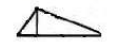
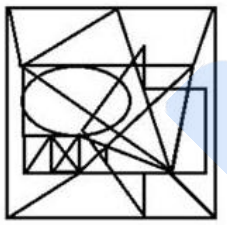
To solve the problem of identifying which option figure contains the given figure (without rotation), let's proceed with a step-by-step examination.
First, observe the given figure:
Our task is to find this figure embedded within the options without rotating it. Let's examine each option one by one:
-
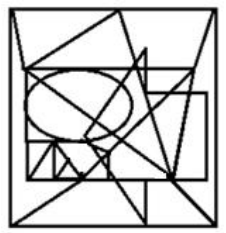
Check if the given figure is visually embedded within this option. It appears the given shape does not match the lines and angles accurately.
-
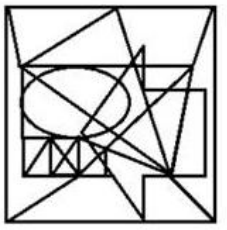
Here too, the given figure does not align with any portion of this option.
-
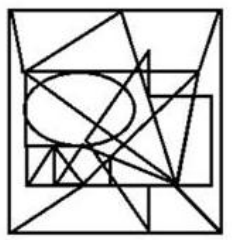
On careful inspection, this option doesn’t contain the shape as required.
-
This option contains the given figure. The lines and angles perfectly match, making it the correct choice.
Therefore, the correct option where the given figure is embedded is:
Conclusion: The given figure is embedded in Option 4 without any rotation.
Important Questions from Hidden Image
Select the option in which the given figure is embedded (rotation is NOT allowed).

Select the option in which the given figure is embedded.

Select the option in which the given figure is embedded (rotation is NOT allowed).

Select the option in which the given figure is embedded (rotation is NOT allowed).

Select the option figure in which the given figure is embedded (rotation is NOT allowed).



